
GPT Image 2AI Prompt
Cinematic Coastal Overlook Portrait — Sora 2 Prompt
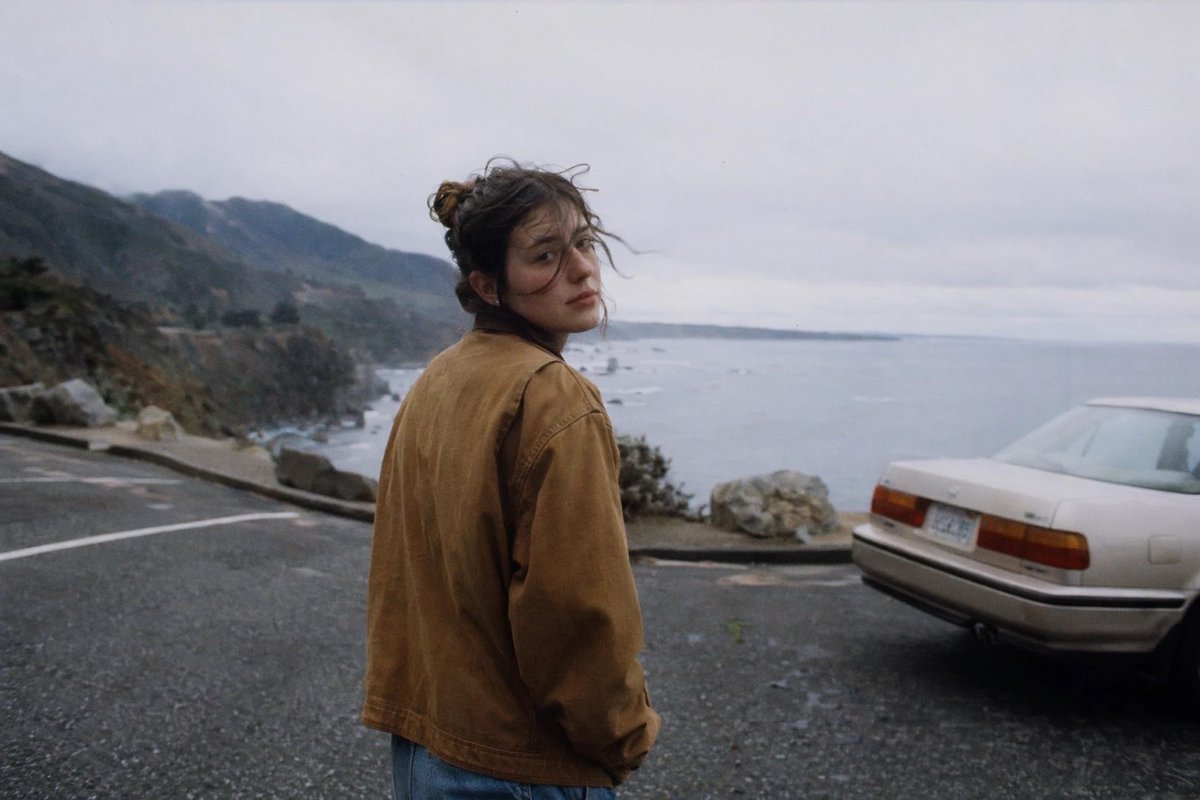
This prompt generates a cinematic portrait of a person at a rainy coastal overlook with a classic car, capturing a nostalgic 35mm road trip aesthetic.
PROMPT · EN
一张电影感十足的抓拍照片,画面中一位 argperson: 年轻女性 站在阴天湿漉漉的沿海路边停车区。视角从后方及侧后方拍摄,她正回头看向镜头。她留着深色凌乱的头发,扎成松散的发髻,发丝被风吹乱,面部轮廓柔和且模糊。她身穿两件可见的衣物:一件磨损的棕褐色帆布夹克和一条中蓝色牛仔裤。她姿态放松,一只手放在口袋附近或口袋里。背景是忧郁的悬崖公路观景台,左侧是深色的岩石山脉,右侧是延伸至远方的灰白色大海,天空阴沉且泛白。画面右侧边缘包含 1 辆停放的浅色 80 年代末或 90 年代初轿车,车尾朝向观众,观景台附近有 1 个大型岩石护栏。沥青路面深暗潮湿,带有模糊的停车线,暗示着刚下过雨。采用自然光,色调柔和偏冷,带有轻微的胶片颗粒感、柔焦效果、淡淡的薄雾,呈现出怀旧的 35mm 公路旅行摄影美学。
About this prompt
This prompt generates a cinematic portrait of a person at a rainy coastal overlook with a classic car, capturing a nostalgic 35mm road trip aesthetic. Use it as a Concept Art starting point for GPT Image 2: keep the visual structure and style constraints intact, then swap in your own subject, brand, or scene.
Start by replacing person, then keep the camera, composition, and material cues in the same order. This makes the output easier to compare across variations.
How to use this prompt
- Copy the prompt from this page.
- Paste it into an AI image generator like Sora 2 or Midjourney.
- If desired, change the
{person}variable to customize the subject (e.g., "年轻男性" or "elderly woman"). - Generate the image. Use settings like 9:16 aspect ratio for a portrait orientation.
- Experiment with additional style modifiers like "film grain" or "soft focus" to enhance the nostalgic effect.


