
GPT Image 2AI Prompt
Photorealistic Chalkboard Lesson with Custom Logo — Sora 2 Prompt
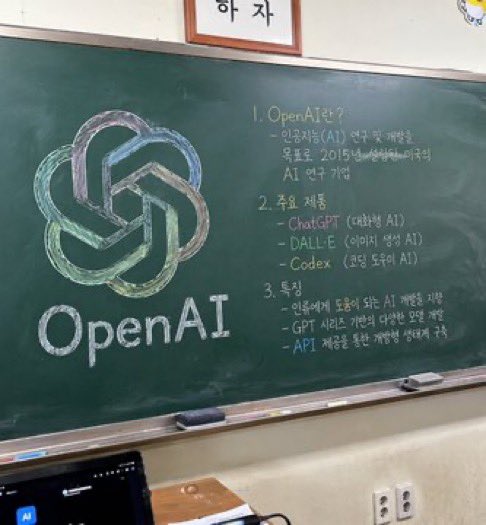
Create a photorealistic classroom blackboard featuring your company logo and organized handwritten notes in a customizable, AI-generated snapshot.
PROMPT · EN
一张照片级逼真、略带角度的教室绿板快照。黑板左侧是一幅精心绘制的粉笔画,展示了 argcompany name: OpenAI 的标志,采用绿色、蓝色和紫色等混合柔和色彩渲染,下方用整洁的白色粉笔写着“arglogo text: OpenAI”。黑板右侧是组织成 3 个编号部分的手写文本。第 1 部分标题为“argsection one title: 1. OpenAI란?”,后跟一段简短的说明性文字。第 2 部分标题为“argsection two title: 2. 주요 제품”,列出了 3 个要点,包括 ChatGPT、DALL-E 和 Codex。第 3 部分标题为“argsection three title: 3. 특징”,包含 3 个描述特征的要点。黑板配有银色金属边框,粉笔槽上放着 2 块长方形黑板擦和零散的粉笔。黑板下方是灰白色的墙壁,上面有一个双孔电源插座。在左下角前景中,可以看到深色笔记本电脑屏幕的顶部边缘,黑板上方,一个带框标志的底部边缘被画面截断。
About this prompt
Create a photorealistic classroom blackboard featuring your company logo and organized handwritten notes in a customizable, AI-generated snapshot. Use it as a Concept Art starting point for GPT Image 2: keep the visual structure and style constraints intact, then swap in your own subject, brand, or scene.
Start by replacing company name, logo text, section one title, and section two title, then keep the camera, composition, and material cues in the same order. This makes the output easier to compare across variations.
How to use this prompt
- Copy the prompt text from this page.
- Choose your AI model (e.g., Sora 2, Midjourney).
- Replace the placeholder variables (company name, logo text, section titles) with your desired content.
- Generate the image. For best results, use high-resolution settings.
- Optionally tweak the prompt to adjust colors or add more details.


