
Sora2 Hub
Sora2 Hub
  • Prompt Library
  • Pricing
  • Showcase
  • Blog
Sora2 Hub
Sora2 Hub
Sora2 Hub

Sora2 Hub

Professional AI creation platform powered by Sora 2, Veo 3.1, and Nano Banana Pro. Create stunning videos and studio-grade images with advanced control, HD quality, and no watermarks.

Email:support@sora2hub.org

AI Video Generator

  • Text to Video
  • Image to Video
  • Veo 3.1
  • Sora 2
  • Kling 3.0
  • Kling 2.6
  • Kling 2.5
  • Runway
  • Wan 2.6
  • Seedance 2.0
  • Hailuo 2.3
  • Grok Imagine
  • HappyHorse-1.0

AI Image Generator

  • Text to Image
  • Image to Image
  • Nano Banana Pro
  • Nano Banana
  • 4o Image
  • Flux Kontext
  • Z Image
  • Seedream 4.5
  • Seedream 5.0 Lite
  • Nano Banana 2
  • GPT Image 2
  • AI Image Upscaler

AI Effects

  • AI Age Filter
  • AI Gender Swap
  • AI Kiss
  • AI Hug
  • Ghibli Image
  • AI Mermaid Filter
  • AI Bodyshake
  • Smiling Filter
  • AI Fat
  • Action Figure

Product

  • Features
  • Showcases
  • Pricing

Company

  • About
  • Contact

© 2025 • Sora2 Hub ORG All rights reserved.

  • Privacy Policy
  • Terms of Service
  • Refund Policy
  1. Home
  2. /
  3. Prompts
  4. /
  5. GPT Image 2
  6. /
  7. Overhead Pool Swimmer — Cinematic Wide Sora 2 Prompt
GPT Image 2AI Prompt

Overhead Pool Swimmer — Cinematic Wide Sora 2 Prompt

Generate a stunning 3:1 ultra-wide cinematic photo of an anonymous swimmer floating beneath crystal-clear turquoise pool water with dappled sunlight and film grain.
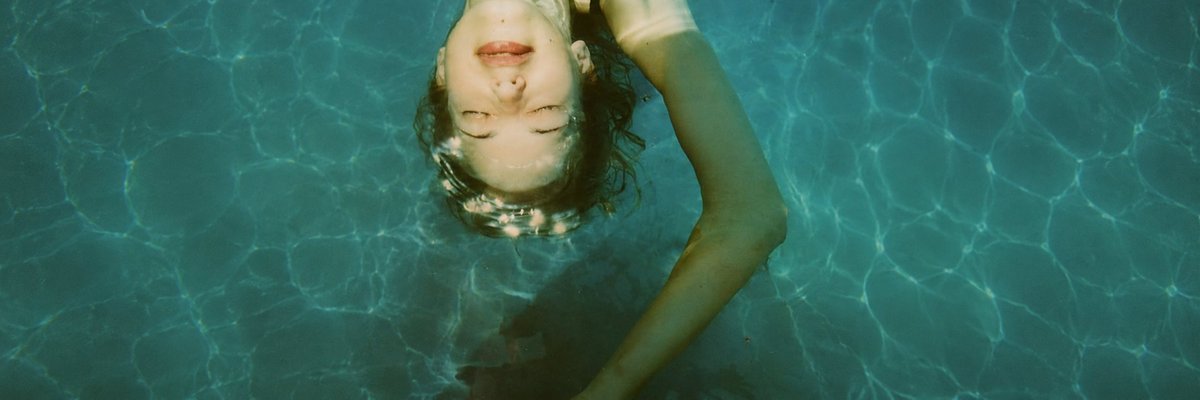
Overhead Pool Swimmer — Cinematic Wide Sora 2 Prompt
PROMPT · EN
创作一张 3:1 超宽幅电影感照片,从正上方俯拍一名 argsubject: 独自游泳者 漂浮在清澈泳池水面下。池水呈现深青色和绿松石色,明亮的阳光水波纹覆盖整个画面。将游泳者置于构图上半部分略偏左的位置,卷曲的 arghair color: 棕色头发 在水中散开,一只长手臂向右上方弧形伸展,身体在水面下逐渐隐入深色阴影中。面部被一个居中的哑光 argface cover color: 米色 长方形遮挡,营造出一种匿名化的编辑风格。使用自然的正午阳光、逼真的水下折射、柔和的蓝绿色调、细腻的胶片颗粒感、高细节表现以及宁静孤独的氛围。左右两侧留出大面积波光粼粼的池水,无文字,无边框,无其他人物。

About this prompt

Generate a stunning 3:1 ultra-wide cinematic photo of an anonymous swimmer floating beneath crystal-clear turquoise pool water with dappled sunlight and film grain. Use it as a Concept Art starting point for GPT Image 2: keep the visual structure and style constraints intact, then swap in your own subject, brand, or scene.

Start by replacing subject, hair color, and face cover color, then keep the camera, composition, and material cues in the same order. This makes the output easier to compare across variations.

How to use this prompt

  1. Copy this prompt and paste it into your preferred AI image generator (e.g., Sora 2, Midjourney, DALL-E).
  2. Select a model that supports wide or custom aspect ratios (3:1 recommended).
  3. Customize the variables like subject, hair color, and face cover color to match your vision.
  4. Generate the image and adjust settings such as seed or style strength if needed.
  5. Download your result and use it for creative projects, wallpapers, or editorial designs.

FAQ

lost in latency

@lostinlatencyX→

Published
May 15, 2026
Language
EN
Model
GPT Image 2
Category
Concept Art
GPT Image 2Concept Artgpt-image-2twitter
Views
490
Copies
72
Likes
25

Share

More from GPT Image 2

Browse all
Indonesian Bird Contest Meme — Low-Quality Phone Photo

Indonesian Bird Contest Meme — Low-Quality Phone Photo

@NyaiiBubu
Anime Schoolgirls Sharing Transparent Umbrella — Sora 2 Prompt

Anime Schoolgirls Sharing Transparent Umbrella — Sora 2 Prompt

@yB7CqdfoDmrbhgD
Sleeping Anime Star Witch — Dreamy Cosmic Sora 2 Prompt

Sleeping Anime Star Witch — Dreamy Cosmic Sora 2 Prompt

@prompts

Create faster with Sora2Hub prompts.

Use curated prompt pages as searchable entry points, then jump straight into generation with the right model context.

Explore prompts

