
GPT Image 2AI Prompt
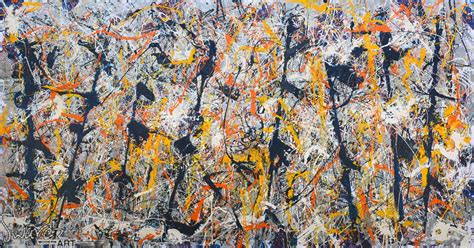
Abstract Drip Painting — Chaotic Childlike Action Art
Generate a wide, museum-quality abstract expressionist canvas full of layered splashes, circles, drips, and rough, childlike textures.
PROMPT · EN
创作一幅抽象表现主义画作,呈现出宽幅横向画布上混乱的童趣滴画风格,灵感源自 20 世纪中叶的行动绘画。采用密集的满幅构图,无中心主体:层叠的喷溅、涂鸦、圆圈、缠绕的线条和滴落痕迹覆盖整个表面。背景应为斑驳的灰白色、浅灰色、米色和灰蓝色,带有刮擦的粗糙质感。加入充满活力的笔触,严格使用五组主色调:黑色/海军蓝的厚重泼溅和垂直条纹、白色的网状滴落、亮橙色的环形笔触、金黄色的喷溅与轨迹,以及小面积的柔和红色点缀。笔触应体现出即兴、凌乱和物理感,带有厚涂颜料般的隆起、抛洒的颜料、类似蜡笔的刮擦线条以及重叠的透明图层。融入淡淡的童趣涂鸦感,但不要出现可辨认的人物、物体、文字或可读的签名。图像应呈现为实拍画作,略带颗粒感,细节丰富,颜料覆盖至边缘,具备博物馆级的艺术质感,采用横向长宽比,表现力强且混乱,但在视觉上保持平衡。
About this prompt
Generate a wide, museum-quality abstract expressionist canvas full of layered splashes, circles, drips, and rough, childlike textures. Use it as a Concept Art starting point for GPT Image 2: keep the visual structure and style constraints intact, then swap in your own subject, brand, or scene.
Start with small changes to subject, scene, camera, and color, then generate a few variations to compare composition and detail without turning the page copy into keyword stuffing.
How to use this prompt
- Copy the full prompt text.
- Choose a capable AI image model (e.g., Sora 2, Midjourney, DALL·E 3).
- Paste the prompt into the input field. You can tweak the color palette (e.g., swap 'bright orange' for 'cerulean blue') or the aspect ratio (e.g., 'square' instead of 'wide horizontal').
- Generate the image. For best results, run multiple generations and select the one with the most balanced chaos.


