
Sora2 Hub
Sora2 Hub
  • Prompt Library
  • Pricing
  • Showcase
  • Blog
Sora2 Hub
Sora2 Hub
Sora2 Hub

Sora2 Hub

Professional AI creation platform powered by Sora 2, Veo 3.1, and Nano Banana Pro. Create stunning videos and studio-grade images with advanced control, HD quality, and no watermarks.

Email:support@sora2hub.org

AI Video Generator

  • Text to Video
  • Image to Video
  • Veo 3.1
  • Sora 2
  • Kling 3.0
  • Kling 2.6
  • Kling 2.5
  • Runway
  • Wan 2.6
  • Seedance 2.0
  • Hailuo 2.3
  • Grok Imagine
  • HappyHorse-1.0

AI Image Generator

  • Text to Image
  • Image to Image
  • Nano Banana Pro
  • Nano Banana
  • 4o Image
  • Flux Kontext
  • Z Image
  • Seedream 4.5
  • Seedream 5.0 Lite
  • Nano Banana 2
  • GPT Image 2
  • AI Image Upscaler

AI Effects

  • AI Age Filter
  • AI Gender Swap
  • AI Kiss
  • AI Hug
  • Ghibli Image
  • AI Mermaid Filter
  • AI Bodyshake
  • Smiling Filter
  • AI Fat
  • Action Figure

Product

  • Features
  • Showcases
  • Pricing

Company

  • About
  • Contact

© 2025 • Sora2 Hub ORG All rights reserved.

  • Privacy Policy
  • Terms of Service
  • Refund Policy
  1. Home
  2. /
  3. Prompts
  4. /
  5. GPT Image 2
  6. /
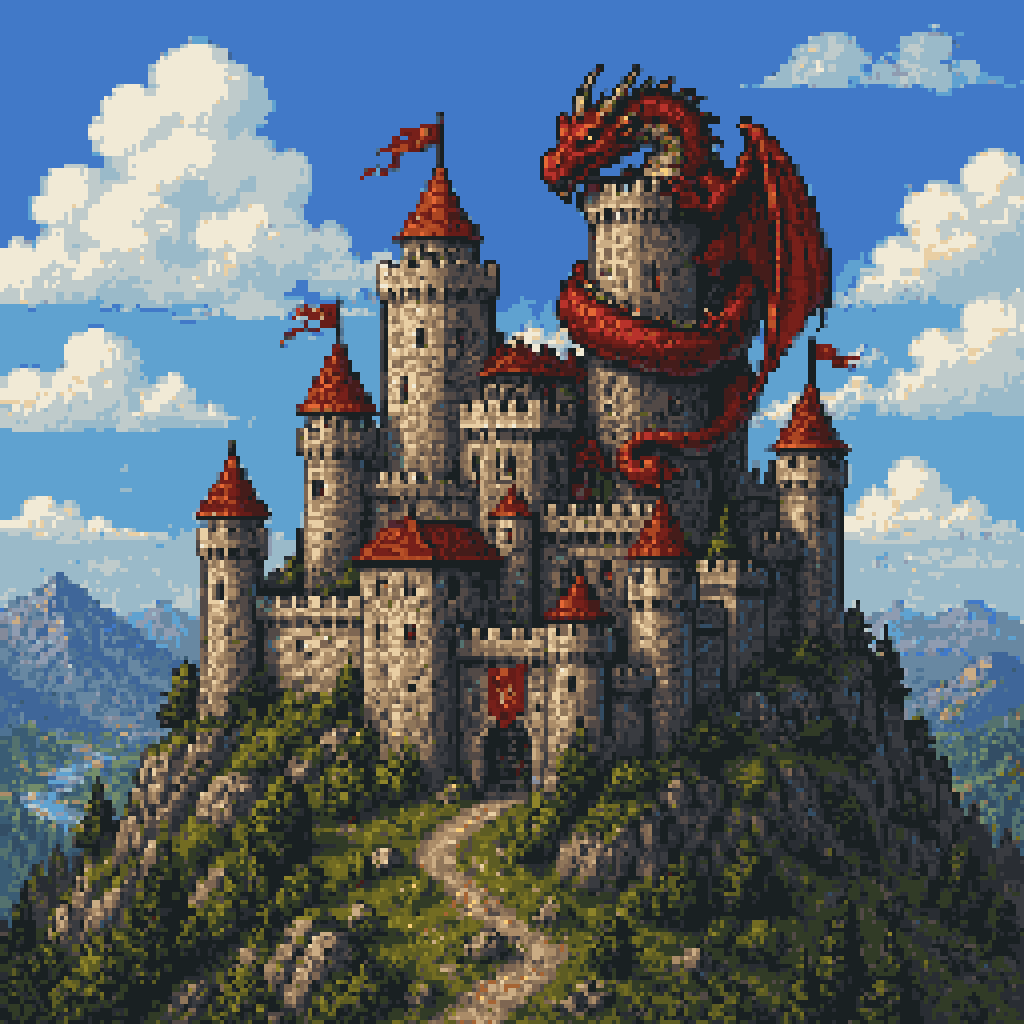
  7. Dragon Castle Pixel Art — Sora 2 Prompt
GPT Image 2AI Prompt

Dragon Castle Pixel Art — Sora 2 Prompt

Generate a stunning 16-bit pixel art scene of a red dragon coiled around a cliffside medieval castle, perfect for RPG games, posters, and fantasy visual design.
Dragon Castle Pixel Art — Sora 2 Prompt
PROMPT · EN
一幅细节丰富的复古奇幻像素艺术场景,描绘了一座巨大的中世纪石砌城堡坐落在陡峭的岩石山上,采用微仰视角,一条蜿蜒的土路通向大门。城堡拥有许多圆柱形塔楼和连接墙,清晰可见 9 座带有红橙色圆锥形屋顶的塔楼,最高的尖塔上飘扬着几面红色小旗,墙体呈现出风化的灰色石材纹理。一条巨大的红龙盘绕在最高的中央塔楼上,长长的身体缠绕着石墙,利爪紧扣城垛,长角的头部向前方探出,右侧展开一只巨大的蝙蝠状翅膀。山丘周围环绕着茂密的深绿色松树和岩石露头,地平线上可见远处的蓝色山脉。城堡背景为明亮的日间天空,呈现饱和的蓝色,点缀着大朵蓬松的白色积云。采用经典的 16 位像素艺术风格渲染,具有清晰的精灵图形状、可见的像素纹理、丰富的对比度、冒险类奇幻游戏封面构图、居中主体以及方形画幅。

About this prompt

Generate a stunning 16-bit pixel art scene of a red dragon coiled around a cliffside medieval castle, perfect for RPG games, posters, and fantasy visual design. Use it as a Concept Art starting point for GPT Image 2: keep the visual structure and style constraints intact, then swap in your own subject, brand, or scene.

Start with small changes to subject, scene, camera, and color, then generate a few variations to compare composition and detail without turning the page copy into keyword stuffing.

How to use this prompt

  1. Copy the prompt text provided above.
  2. Visit sora2hub.com and choose a pixel art or fantasy art generation model.
  3. Paste the prompt into the input field.
  4. Set the aspect ratio to square (1:1) and select a high resolution for best detail.
  5. Click generate and refine the prompt as needed to achieve your desired style.

FAQ

Astropulse

@RealAstropulse→

Published
Apr 25, 2026
Language
EN
Model
GPT Image 2
Category
Concept Art
GPT Image 2Concept Artgpt-image-2twitter
Views
840
Copies
97
Likes
64

Share

More from GPT Image 2

Browse all
Photorealistic Fashion Magazine Cover — Sora 2 Prompt

Photorealistic Fashion Magazine Cover — Sora 2 Prompt

@aichof21
Sleeping Anime Star Witch — Dreamy Cosmic Sora 2 Prompt

Sleeping Anime Star Witch — Dreamy Cosmic Sora 2 Prompt

@prompts
AI-Generated Japanese Travel Ad Grid — Sora Prompt

AI-Generated Japanese Travel Ad Grid — Sora Prompt

@jblogpham

Create faster with Sora2Hub prompts.

Use curated prompt pages as searchable entry points, then jump straight into generation with the right model context.

Explore prompts

