
GPT Image 2AI Prompt
Crayon Drawing Style — Childlike Portrait Prompt
Transform any image into a vibrant, whimsical crayon drawing that captures the innocent charm of a child's artwork.
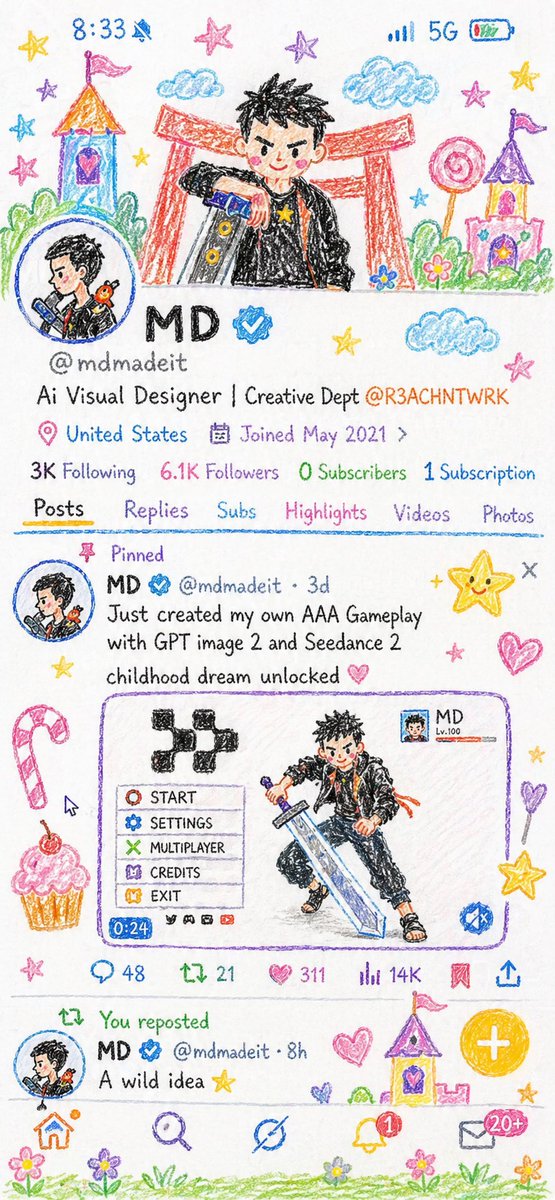
PROMPT · EN
将给定图片重新创作为蜡笔画风格的插画,使整个画面呈现出 10 岁孩子手绘的效果。保持造型简洁且略带瑕疵,如同儿童画一般。避免使用原始配色,改为在干净的白纸背景上使用明亮、活泼的蜡笔色。追求柔和、可爱且纯真的美学风格。融入城堡、塔楼、糖果、星星、云朵等充满童趣的细节,以增强画面的趣味性。最终效果应充满魅力、色彩斑斓,并洋溢着孩童般的想象力。
About this prompt
Transform any image into a vibrant, whimsical crayon drawing that captures the innocent charm of a child's artwork. Use it as a Concept Art starting point for GPT Image 2: keep the visual structure and style constraints intact, then swap in your own subject, brand, or scene.
Start with small changes to subject, scene, camera, and color, then generate a few variations to compare composition and detail without turning the page copy into keyword stuffing.
How to use this prompt
- Copy the prompt text and open your preferred AI image model (like Sora 2).
- Upload or reference the source image you want to transform.
- Optionally tweak details like the background elements (e.g., castles, stars) to match your vision.
- Generate the image and review the crayon-style output.
- Adjust the prompt and regenerate if you want different colors or details.


