GPT Image 2AI Prompt

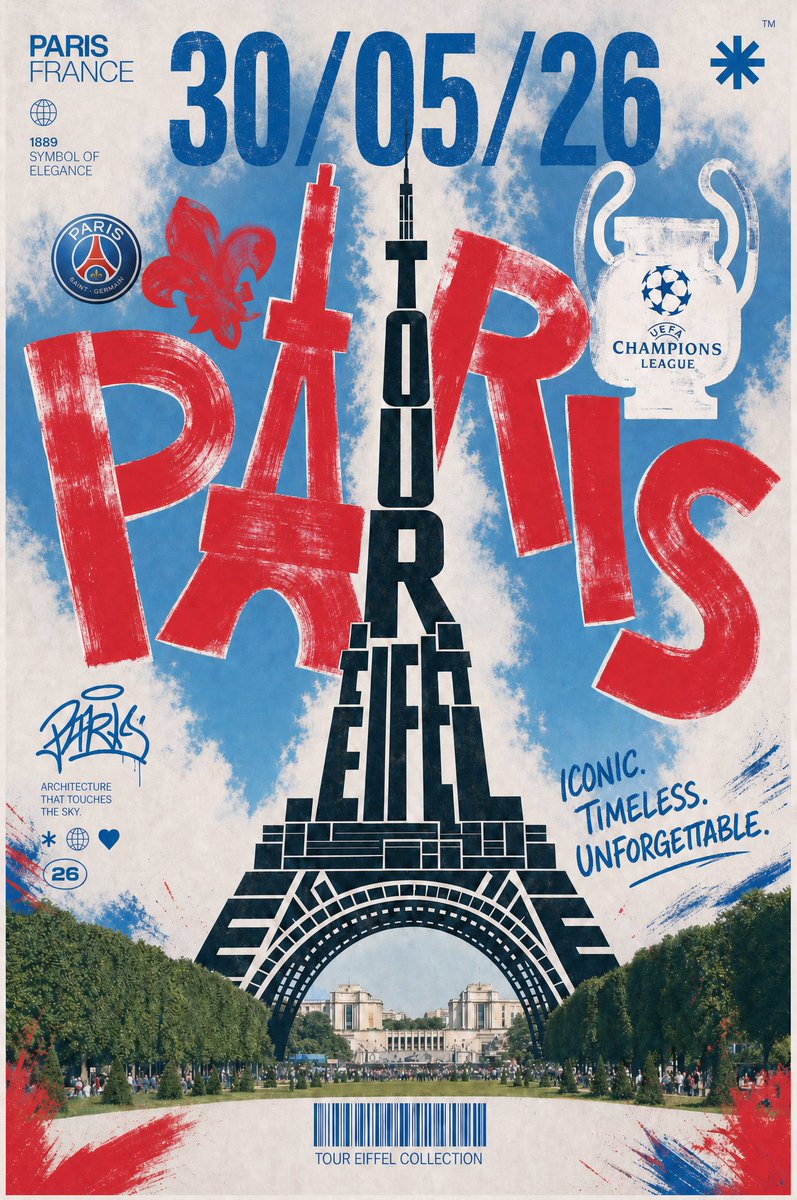
Retro Paris UCL Final Poster — Vintage Football Art Prompt

Generate a vintage Paris travel poster for the Champions League Final, featuring the Eiffel Tower and PSG colors in a distressed screen-print style.
Retro Paris UCL Final Poster — Vintage Football Art Prompt
PROMPT · EN
type
复古巴黎足球决赛海报
format
竖版旅行海报,做旧丝网印刷拼贴风格
theme
法国巴黎,埃菲尔铁塔,PSG 配色,欧冠决赛庆典
main_text
date
{argument name="date text" default="30/05/26"}
city_word
{argument name="city word" default="PARIS"}
tower_word
{argument name="tower word" default="TOUR EIFFEL"}
slogan
{argument name="slogan text" default="ICONIC. TIMELESS. UNFORGETTABLE."}
layout
background
做旧米白色纸张,带有蓝色云雾状涂料洗刷效果,红蓝笔触边角,磨损的墨迹纹理,磨损的边缘
centerpiece
黑色的埃菲尔铁塔图形,由堆叠的块状字母垂直拼写出 TOUR EIFFEL,铁塔底部的拱门与从战神广场望向特罗卡德罗的写实视角相结合,底部有林荫大道和微小的人群
oversized_typography
巨大的做旧红色字母 PARIS 对角线横跨画面中间;字母 A 被设计成埃菲尔铁塔的剪影;字母与铁塔和蓝色天空涂料重叠
top_area
count
3
elements
item 1
左上角蓝色压缩无衬线字体标题 PARIS FRANCE
item 2
顶部居中巨大的蓝色日期 30/05/26
item 3
右上角小型蓝色星号/星形符号,带有微小的 TM 标记
left_column
count
6
elements
item 1
小型地球仪图标
item 2
文本块:1889 SYMBOL OF ELEGANCE
item 3
带有巴黎圣日耳曼配色的圆形 PSG 风格徽章
item 4
红色鸢尾花符号
item 5
蓝色涂鸦签名,写着 Paris
item 6
小型说明文字 ARCHITECTURE THAT TOUCHES THE SKY,配有三个图标:星号、地球仪、爱心,以及一个带圈数字 26
right_column
count
2
elements
item 1
白色欧冠奖杯图标,带有蓝色星形球标志和 UEFA CHAMPIONS LEAGUE 文字
item 2
手写蓝色标语 ICONIC. TIMELESS. UNFORGETTABLE. 并带有下划线
bottom_area
count
3
elements
item 1
埃菲尔铁塔拱门下的写实全景公园场景
item 2
底部居中的蓝色条形码
item 3
条形码下方的说明文字 TOUR EIFFEL COLLECTION
style
color_palette
巴黎圣日耳曼红、深宝蓝色、海军黑、米白色纸张、柔和的绿色树木
printing
大胆的孔版印刷/丝网印刷外观,粗糙的干笔触边缘,可见的墨迹磨损,做旧的半色调纹理
typography
混合使用高瘦压缩无衬线字体、巨大的粗糙块状字母、模板风格的黑色铁塔字体、手写记号笔批注
mood
运动感、收藏级、庆典风、标志性的巴黎地标欧冠决赛海报
composition_notes
使海报以埃菲尔铁塔为中心对称,保持顶部的日期占据主导地位,红色的 PARIS 字母要非常大,奖杯在右上角清晰可见;不使用照片参考,所有元素均通过文本生成。
customization
club crest
{argument name="club crest" default="PSG-style crest"}

About this prompt

Generate a vintage Paris travel poster for the Champions League Final, featuring the Eiffel Tower and PSG colors in a distressed screen-print style. Use it as a Concept Art starting point for GPT Image 2: keep the visual structure and style constraints intact, then swap in your own subject, brand, or scene.

This prompt is organized as structured JSON with fields such as type, format, theme, main text, layout, style, and composition notes. Keeping that hierarchy helps the model separate the subject, layout, interface elements, and detail constraints.

Start with small changes to subject, scene, camera, and color, then generate a few variations to compare composition and detail without turning the page copy into keyword stuffing.

How to use this prompt

  1. Copy the entire prompt code block above.
  2. Paste it into your preferred AI image generator (e.g., Midjourney, DALL-E 3, or Stable Diffusion).
  3. Customize the variables inside {} like the date (date text) or city name (city word) to match your event.
  4. Generate the image and upscale if necessary for a high-resolution print.
FAQ

More from GPT Image 2

Browse all

Create faster with Sora2Hub prompts.

Use curated prompt pages as searchable entry points, then jump straight into generation with the right model context.

Explore prompts