
GPT Image 2AI Prompt
Luxury Fashion Ad Poster — Sora 2 Prompt
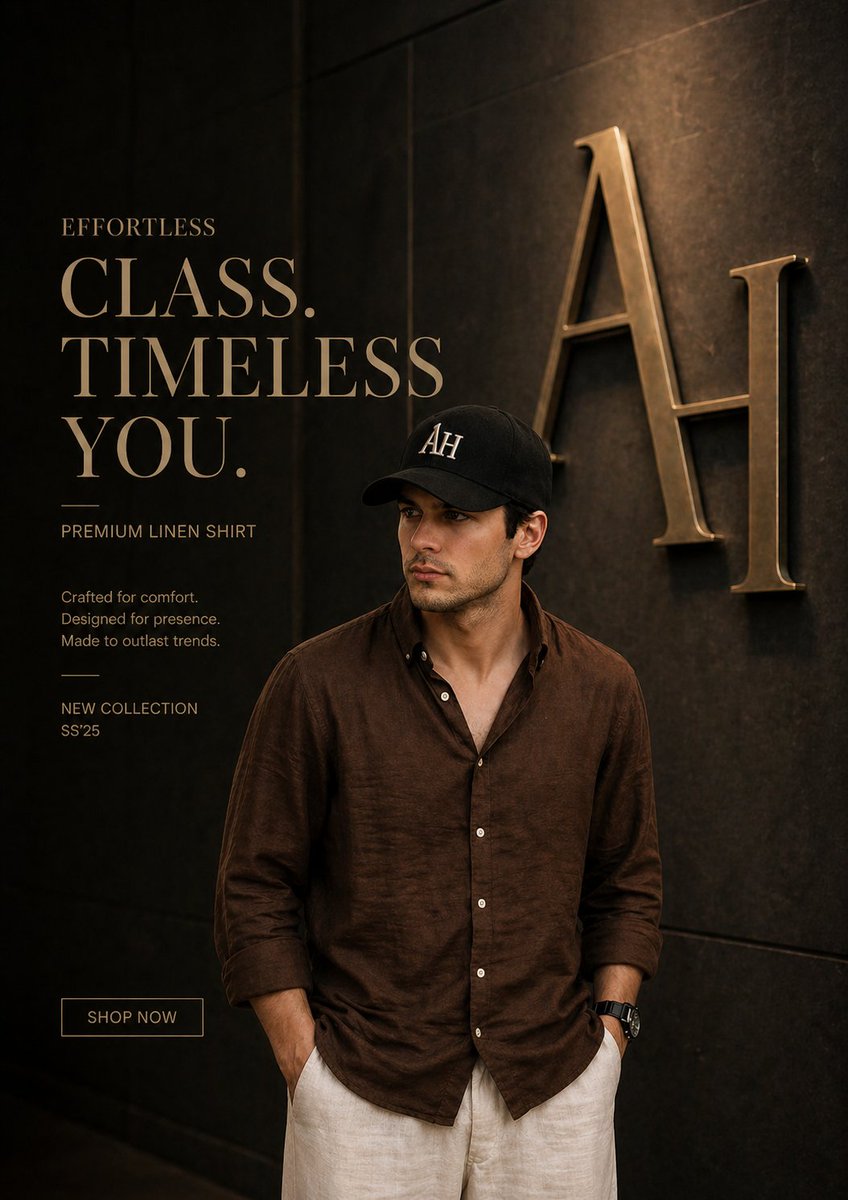
Generate a hyper-realistic Gucci-style men's fashion ad with cinematic lighting, monogram backdrop, and premium editorial layout.
PROMPT · EN
奢华时尚广告海报,全身男模特以自信放松的姿态站立,双手插兜,身穿优质 argshirt color: 棕色 亚麻衬衫(微皱纹理),米色定制长裤,极简配饰,干净的审美风格
面部:轮廓分明的男性特征,写实,发型精致,佩戴带有“arglogo: AH”刺绣标志的黑色鸭舌帽,不佩戴耳机
背景:深色纹理奢华墙面,模特身后浮雕有巨大的金属“AH”字母组合标志,背景略微虚化,带有温暖的金色反光
光影:柔和的电影级布光,暖色调,高对比度阴影,高级编辑风格
构图:模特位于右侧,左侧留白以便排版
文字(左侧,优雅衬线奢华字体,金色):
argmain text: EFFORTLESS\nCLASS.\nTIMELESS\nYOU.
副标题:
PREMIUM LINEN SHIRT
为舒适而生。
为气场而设计。
经久不衰的经典。
页脚:
NEW COLLECTION SS’25
按钮:
SHOP NOW(极简轮廓框)
风格:超写实,高端时尚大片,Gucci/YSL 风格奢华品牌感,细节锐利,8k 分辨率,编辑摄影,景深,干净的高级排版
调色:暖金色 + 深棕色调,电影级奢华质感
About this prompt
Generate a hyper-realistic Gucci-style men's fashion ad with cinematic lighting, monogram backdrop, and premium editorial layout. Use it as a Concept Art starting point for GPT Image 2: keep the visual structure and style constraints intact, then swap in your own subject, brand, or scene.
Start by replacing shirt color, logo, and main text, then keep the camera, composition, and material cues in the same order. This makes the output easier to compare across variations.
How to use this prompt
- Copy the full prompt from the page.
- Choose your preferred AI image/video model (e.g., Sora 2, Midjourney, DALL·E 3).
- Edit the variables such as shirt color, logo, and main text to match your brand.
- Generate the image and adjust aspect ratio to 9:16 or 4:5 for best results.
- Use the output as a campaign hero image or social media creative.


