
GPT Image 2AI Prompt
Bangkok Night Market Street Photography — Sora 2 Prompt
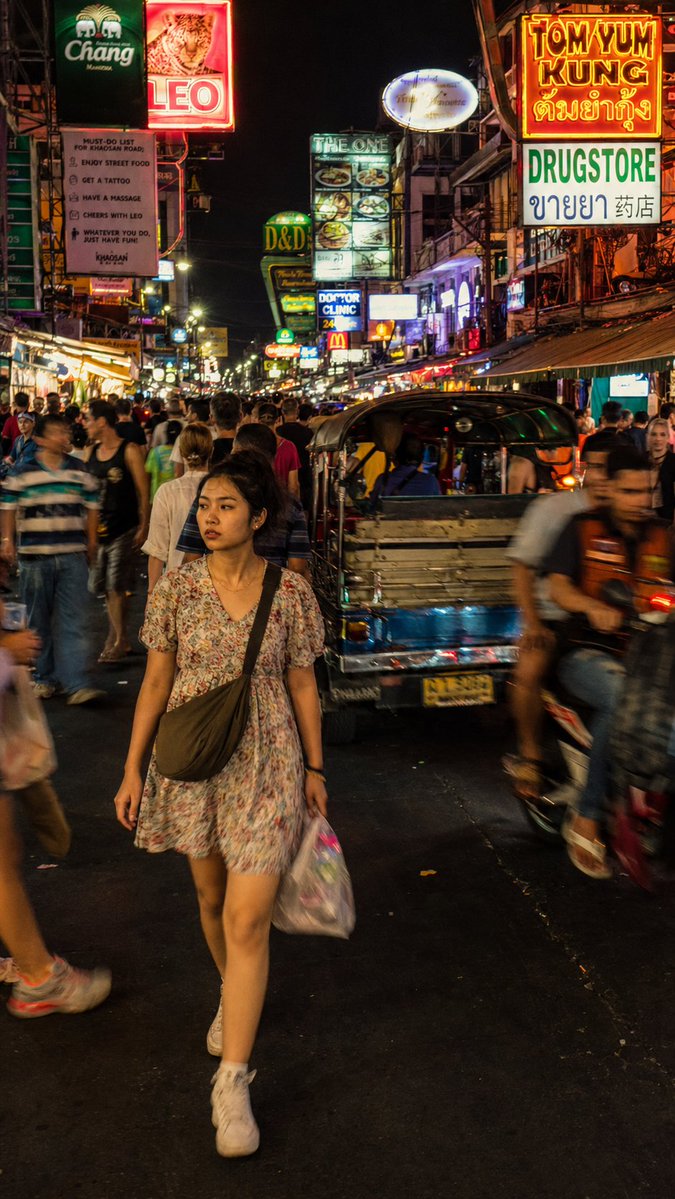
Generate a hyper-realistic documentary street photo of a woman navigating Bangkok's neon-drenched Khao San Road, complete with film grain, dynamic blur, and authentic chaotic atmosphere.
1 / 2
PROMPT · EN
一张街头摄影作品,捕捉了一位 argsubject: 年轻泰国女性 穿过 arglocation: 曼谷考山路 拥挤夜市的瞬间。主体正迈步前行,身穿 argclothing: 宽松碎花连衣裙,表情自然且略显分神,并未看向镜头,肩上背着一个小斜挎包。环境密集而混乱:泰语和英语的酒吧招牌垂直堆叠,嘟嘟车和摩托车在人流中穿梭,游客与当地人混杂在移动的人群中。光线杂乱且真实:酒吧荧光灯的不均匀照射、LED 招牌的散射光,以及人群中偶尔反射的闪光,没有单一的干净光源。构图:略高于视角的全身中景,主体位于画面左侧中心并清晰对焦,周围人群呈现自然的动态模糊,霓虹灯招牌在垂直构图中向上延伸。色调:酸性黄、电光粉、深橙色——强烈的霓虹饱和度,符合纪录片真实感,而非风格化处理。渲染要求:摄影级真实感,带有细微的胶片颗粒感,避免过度平滑的 CG 质感。皮肤:具备次表面散射和微纹理。保留背景人群真实的动态模糊,而非人工虚化。照片级渲染,无水印。
About this prompt
Generate a hyper-realistic documentary street photo of a woman navigating Bangkok's neon-drenched Khao San Road, complete with film grain, dynamic blur, and authentic chaotic atmosphere. Use it as a Concept Art starting point for GPT Image 2: keep the visual structure and style constraints intact, then swap in your own subject, brand, or scene.
Start by replacing subject, location, and clothing, then keep the camera, composition, and material cues in the same order. This makes the output easier to compare across variations.
How to use this prompt
- Copy the full prompt from the page.
- Select a compatible AI image/video model (e.g., Sora 2, Midjourney, Stable Diffusion).
- Customize the variables
{subject},{location}, and{clothing}within the prompt to fit your creative vision. - Paste the modified prompt into your chosen model's interface and generate.
- Review the output, adjusting settings like aspect ratio or style parameters if needed.


