
Ukiyo-e Portrait Prompt — Turn Any Face into Edo-Period Art
Create a traditional Ukiyo-e portrait that preserves facial likeness while adding kimono, flat colors, ink outlines, and Japanese motifs.
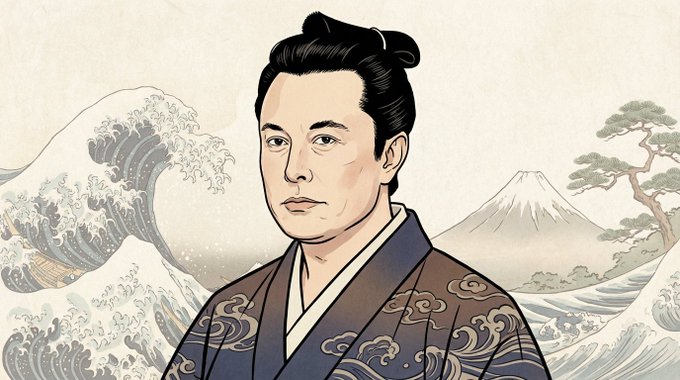
Japanese Ukiyo-e portrait of the person in the reference image attached here. Preserve their facial features and likeness while transforming them into a traditional Edo-period aesthetic. Use flat color blocks, bold ink outlines, minimal shading, and a textured paper background. Style the hair, clothing, and accessories in authentic Japanese traditional fashion such as kimono patterns. Include classic Ukiyo-e elements like soft gradients, muted natural tones, and subtle background motifs (waves, clouds, or floral patterns). Maintain a calm, composed expression and balanced composition, with a slightly angled face and elegant posture
About this prompt
Create a traditional Ukiyo-e portrait that preserves facial likeness while adding kimono, flat colors, ink outlines, and Japanese motifs. Use it as a Concept Art starting point for an AI model: keep the visual structure and style constraints intact, then swap in your own subject, brand, or scene.
Common directions include chatgpt, 浮世绘, 江户风, and 人物像. Treat these tags as creative cues; the prompt structure and preview image are the more useful guide.
Start with small changes to subject, scene, camera, and color, then generate a few variations to compare composition and detail without turning the page copy into keyword stuffing.
How to use this prompt
- Copy the Ukiyo-e prompt above.
- Open an AI image generator like Sora, Midjourney, or DALL·E.
- Paste the prompt and upload a reference portrait image.
- Optionally tweak style weights or aspect ratio for best results.
- Generate and download your Edo-style portrait.


