
Sora2 Hub
Sora2 Hub
  • Prompt Library
  • Pricing
  • Showcase
  • Blog
Sora2 Hub
Sora2 Hub
Sora2 Hub

Sora2 Hub

Professional AI creation platform powered by Sora 2, Veo 3.1, and Nano Banana Pro. Create stunning videos and studio-grade images with advanced control, HD quality, and no watermarks.

Email:support@sora2hub.org

AI Video Generator

  • Text to Video
  • Image to Video
  • Veo 3.1
  • Sora 2
  • Kling 3.0
  • Kling 2.6
  • Kling 2.5
  • Runway
  • Wan 2.6
  • Seedance 2.0
  • Hailuo 2.3
  • Grok Imagine
  • HappyHorse-1.0

AI Image Generator

  • Text to Image
  • Image to Image
  • Nano Banana Pro
  • Nano Banana
  • 4o Image
  • Flux Kontext
  • Z Image
  • Seedream 4.5
  • Seedream 5.0 Lite
  • Nano Banana 2
  • GPT Image 2
  • AI Image Upscaler

AI Effects

  • AI Age Filter
  • AI Gender Swap
  • AI Kiss
  • AI Hug
  • Ghibli Image
  • AI Mermaid Filter
  • AI Bodyshake
  • Smiling Filter
  • AI Fat
  • Action Figure

Product

  • Features
  • Showcases
  • Pricing

Company

  • About
  • Contact

© 2025 • Sora2 Hub ORG All rights reserved.

  • Privacy Policy
  • Terms of Service
  • Refund Policy
  1. Home
  2. /
  3. Prompts
  4. /
  5. GPT Image 2
  6. /
  7. 5-View Scavenger Turnaround — Sora 2 Prompt
GPT Image 2AI Prompt

5-View Scavenger Turnaround — Sora 2 Prompt

Create a detailed 5-view turnaround of a young scavenger adventurer in high-detail anime concept art style, perfect for modeling and reference.
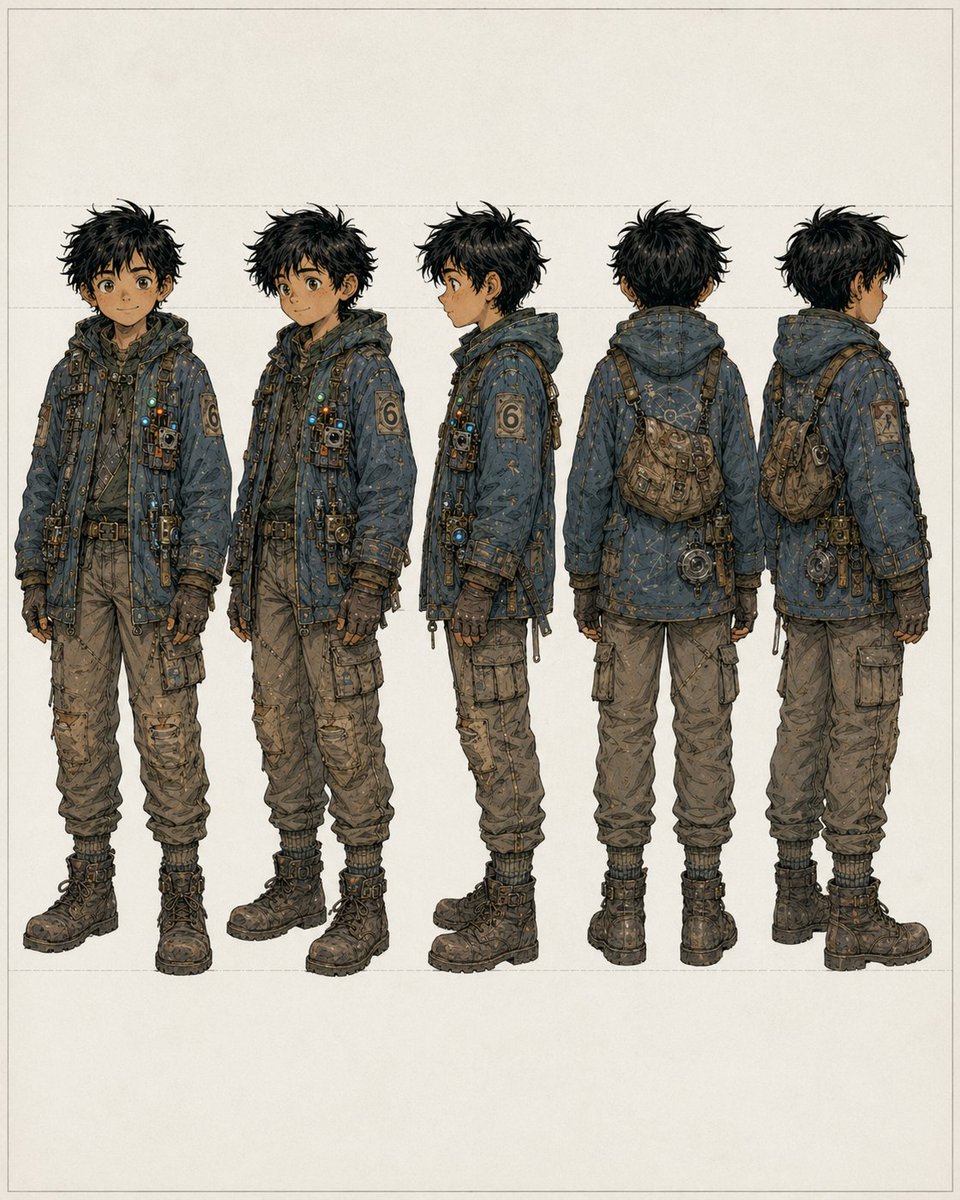
5-View Scavenger Turnaround — Sora 2 Prompt
PROMPT · EN
type
角色转面图
subject
年轻男性拾荒者/冒险家的全身概念艺术
style
高细节动漫风格概念设计,采用精细墨线,色调为柔和的大地色系,带有轻微的风化质感,呈现出简洁的画室风格
background
color
暖米白色纸张
details
极简空白背景,带有淡淡的矩形辅助线和宽阔的页边距
character
age_appearance
少年
build
身材苗条,略显矮小,比例实用
hair
color
{argument name="hair color" default="凌乱的黑色"}
style
浓密凌乱的短发,轮廓尖锐且不修边幅
face
visibility
正面和侧面视图中面部部分遮挡或模糊,无清晰的面部细节
outfit
outerwear
超大号连帽功能性夹克,呈低饱和度的蓝灰色,有明显的缝合和补丁,覆盖着小带子、紧固件、悬垂的绳索、金属夹、微型灯具和技术小配件
left_sleeve_patch
大型数字 6 补丁
pants
宽松的棕褐色工装裤,带有多个口袋、褶皱、磨损痕迹和收口裤脚
gloves
深色露指或贴合的功能性手套
boots
厚底深色系带战斗靴
accessories
item 1
斜挎背带
item 2
胸前安装的小袋和装置
item 3
带有挂载工具和悬挂五金件的腰带
item 4
背部/侧面斜挎的小型磨损挎包
item 5
后视图中悬挂在臀部附近的圆形机械装置
palette
灰蓝色、炭灰色、棕色、棕褐色、黄铜色及柔和的金属色点缀
layout
composition
五个均匀分布的全身形象水平排列
views
item 1
正面视图
item 2
前侧 45 度视图
item 3
左侧面视图
item 4
背面视图
item 5
后侧 45 度视图
count
5
presentation
比例一致,转面/参考图格式,页面居中

About this prompt

Create a detailed 5-view turnaround of a young scavenger adventurer in high-detail anime concept art style, perfect for modeling and reference. Use it as a Concept Art starting point for GPT Image 2: keep the visual structure and style constraints intact, then swap in your own subject, brand, or scene.

This prompt is organized as structured JSON with fields such as type, subject, style, background, character, and layout. Keeping that hierarchy helps the model separate the subject, layout, interface elements, and detail constraints.

Start with small changes to subject, scene, camera, and color, then generate a few variations to compare composition and detail without turning the page copy into keyword stuffing.

How to use this prompt

  1. Copy the prompt text from this page.
  2. Open your preferred AI image generator (e.g., Sora, Midjourney, Stable Diffusion).
  3. Paste the prompt and adjust any variable like hair color if desired.
  4. Generate the image and iterate for best results.
  5. Use the output as concept art or reference for 3D modeling.

FAQ

𝚔𝚊𝚒 🤖+🧠

@kaigani→

Published
Apr 30, 2026
Language
EN
Model
GPT Image 2
Category
Concept Art
GPT Image 2Concept Artgpt-image-2twitter
Views
714
Copies
39
Likes
22

Share

More from GPT Image 2

Browse all
AI-Generated Japanese Travel Ad Grid — Sora Prompt

AI-Generated Japanese Travel Ad Grid — Sora Prompt

@jblogpham
Minimalist Mother's Day Wallpaper — Sora 2 Prompt with Calligraphy & Carnations

Minimalist Mother's Day Wallpaper — Sora 2 Prompt with Calligraphy & Carnations

@EdimakorJP
Sacred Dragon Dome Ceiling Mural — Sora 2 Prompt

Sacred Dragon Dome Ceiling Mural — Sora 2 Prompt

@KanaWorks_AI

Create faster with Sora2Hub prompts.

Use curated prompt pages as searchable entry points, then jump straight into generation with the right model context.

Explore prompts

