Sora2 Hub
Sora2 Hub
  • Prompt Library
  • Pricing
  • Showcase
  • Blog
Sora2 Hub
Sora2 Hub
Sora2 Hub

Sora2 Hub

Professional AI creation platform powered by Sora 2, Veo 3.1, and Nano Banana Pro. Create stunning videos and studio-grade images with advanced control, HD quality, and no watermarks.

Email:support@sora2hub.org

AI Video Generator

  • Text to Video
  • Image to Video
  • Veo 3.1
  • Sora 2
  • Kling 3.0
  • Kling 2.6
  • Kling 2.5
  • Runway
  • Wan 2.6
  • Seedance 2.0
  • Hailuo 2.3
  • Grok Imagine
  • HappyHorse-1.0
  • HappyHorse 1.1
  • Kling 3.0 Turbo
  • Volcengine Video-to-Video Lip Sync
  • OmniHuman 1.5
  • Grok Imagine Video 1.5
  • Gemini Omni
  • Wan 2.7 Video
  • Seedance 2.0 Mini

AI Image Generator

  • Text to Image
  • Image to Image
  • Nano Banana Pro
  • Nano Banana
  • 4o Image
  • Flux Kontext
  • Z Image
  • Seedream 4.5
  • Seedream 5.0 Lite
  • Nano Banana 2
  • GPT Image 2
  • AI Image Upscaler
  • Seedream 5.0 Pro
  • Nano Banana 2 Lite
  • Qwen Image 2.0

AI Effects

  • AI Age Filter
  • AI Gender Swap
  • AI Kiss
  • AI Hug
  • Ghibli Image
  • AI Mermaid Filter
  • AI Bodyshake
  • Smiling Filter
  • AI Fat
  • Action Figure

Product

  • Features
  • Showcases
  • Pricing

Company

  • About
  • Contact

© 2025 • Sora2 Hub ORG All rights reserved.

  • Privacy Policy
  • Terms of Service
  • Refund Policy
  1. Home
  2. /
  3. Prompts
  4. /
  5. GPT Image 2
  6. /
  7. Scenic Photo Wall Calendar — Customizable Monthly Page
GPT Image 2AI Prompt

Scenic Photo Wall Calendar — Customizable Monthly Page

Create a realistic wall calendar with a stunning scenic photo on top and a detailed, color-coded monthly grid below, fully customizable with your own dates and locations.
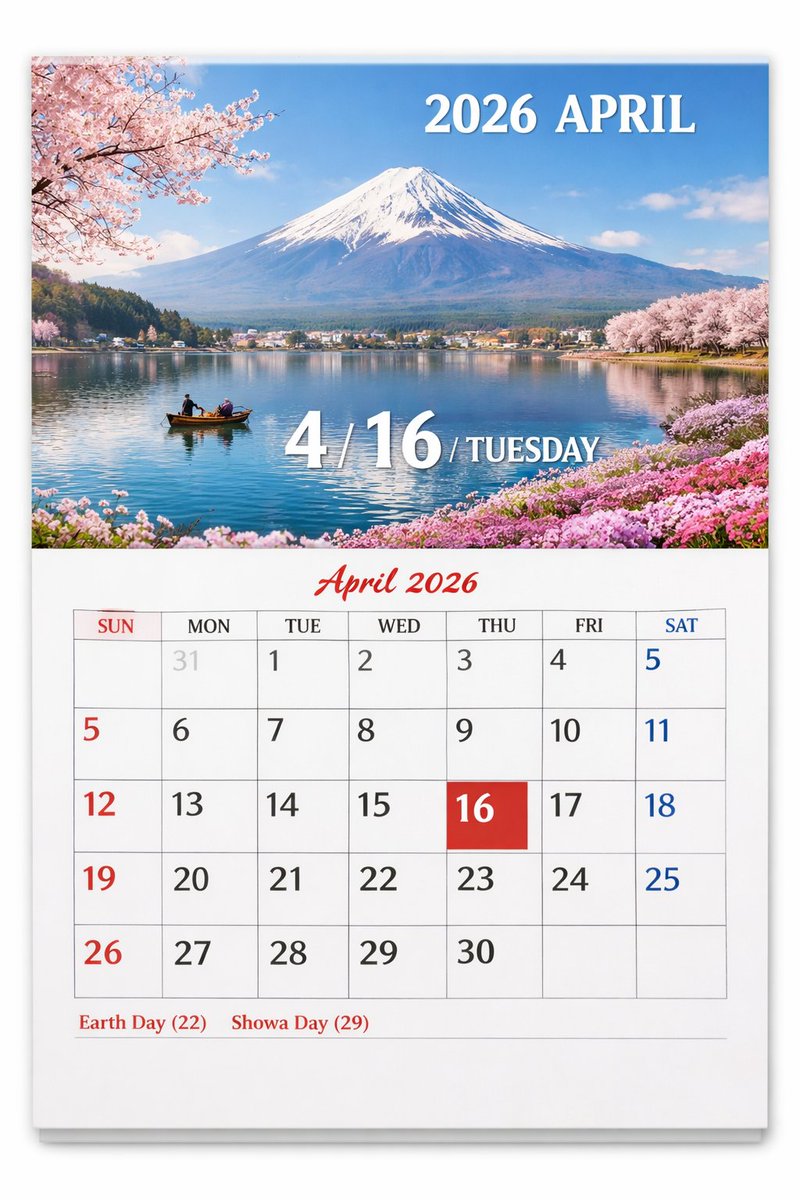
Scenic Photo Wall Calendar — Customizable Monthly Page
PROMPT · EN
type
wall calendar page
presentation
physical paper calendar hanging on a white wall with a subtle drop shadow
layout
top_half
type
scenic photograph
subject
{argument name="scenic location" default="Mount Fuji with cherry blossoms and a lake"}
details
snow-capped mountain, calm blue lake reflection, small wooden boat with two people, pink cherry blossoms framing the top left and right shores, pink flowers on the bottom right shore
text_overlays
item 1
position
top right
text
{argument name="year and month" default="2026 APRIL"}
style
white serif font
item 2
position
bottom center
text
4 / {argument name="highlighted date" default="16"} / {argument name="day of week" default="TUESDAY"}
style
large white serif font with drop shadow
bottom_half
type
calendar grid
header
text
April 2026
style
red cursive script font, centered
grid_structure
columns
7
rows
5
column_headers
item 1
SUN
item 2
MON
item 3
TUE
item 4
WED
item 5
THU
item 6
FRI
item 7
SAT
grid_content
highlighted_cell
date
{argument name="highlighted date" default="16"}
style
solid red square background, white text
number_colors
Sundays in red, Saturdays in blue, weekdays in black, previous month dates in light gray
notable_features
AI generation artifact where the number 5 appears twice (end of row 1, start of row 2)
footer
text
{argument name="holidays" default="Earth Day (22) Showa Day (29)"}
position
bottom left
style
red serif font

About this prompt

Create a realistic wall calendar with a stunning scenic photo on top and a detailed, color-coded monthly grid below, fully customizable with your own dates and locations. Use it as a Concept Art starting point for GPT Image 2: keep the visual structure and style constraints intact, then swap in your own subject, brand, or scene.

This prompt is organized as structured JSON with fields such as type, presentation, and layout. Keeping that hierarchy helps the model separate the subject, layout, interface elements, and detail constraints.

Start with small changes to subject, scene, camera, and color, then generate a few variations to compare composition and detail without turning the page copy into keyword stuffing.

How to use this prompt

  1. Copy the entire prompt template.
  2. Choose an AI model like Sora 2 that supports image generation from detailed text.
  3. Customize the variables inside curly braces—such as scenic location, year and month, and highlighted date—to match your desired calendar.
  4. Generate the image and review the output for any creative artifacts.
  5. Use the final calendar page for digital wallpaper, planning, or a personalized print.
FAQ

上官 Devin

@prompts→

Published
Apr 30, 2026
Language
EN
Model
GPT Image 2
Category
Concept Art
GPT Image 2Concept Artgpt-image-2gptimage2api promptsgptimage2apien
Views
987
Copies
90
Likes
49

Share

More from GPT Image 2

Browse all
Cyberpunk AI Launch Banner — Cinematic Neon Poster Prompt

Cyberpunk AI Launch Banner — Cinematic Neon Poster Prompt

@ObieriI
Sleeping Anime Star Witch — Dreamy Cosmic Sora 2 Prompt

Sleeping Anime Star Witch — Dreamy Cosmic Sora 2 Prompt

@prompts
Photorealistic Fashion Magazine Cover — Sora 2 Prompt

Photorealistic Fashion Magazine Cover — Sora 2 Prompt

@aichof21

Create faster with Sora2Hub prompts.

Use curated prompt pages as searchable entry points, then jump straight into generation with the right model context.

Explore prompts