
Visa App UI Before-After — Sora 2 Prompt
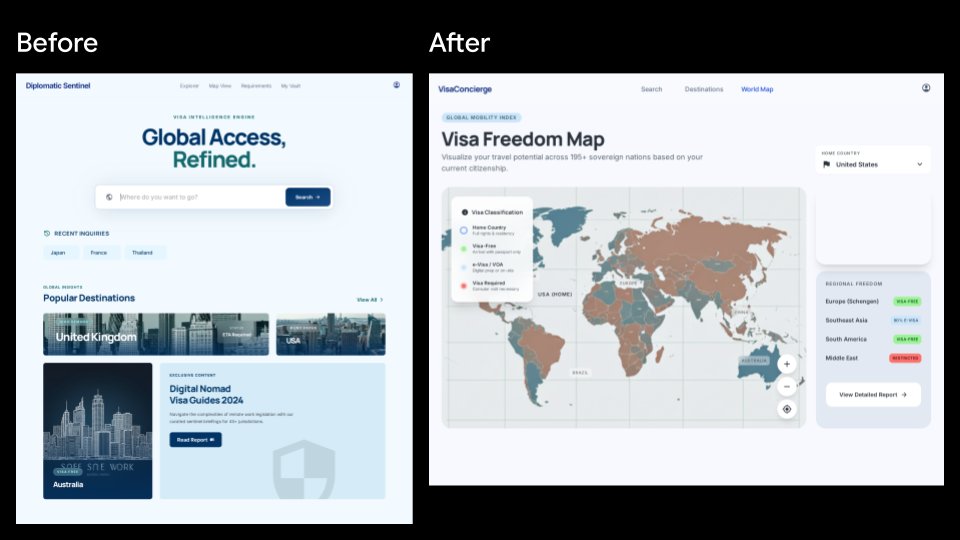
Generate a sleek SaaS-style comparison showing an old visa landing page redesigned into an interactive global mobility dashboard.
About this prompt
Generate a sleek SaaS-style comparison showing an old visa landing page redesigned into an interactive global mobility dashboard. Use it as a Concept Art starting point for GPT Image 2: keep the visual structure and style constraints intact, then swap in your own subject, brand, or scene.
This prompt is organized as structured JSON with fields such as type, canvas, layout, left before screen, right after screen, and overall direction. Keeping that hierarchy helps the model separate the subject, layout, interface elements, and detail constraints.
Start with small changes to subject, scene, camera, and color, then generate a few variations to compare composition and detail without turning the page copy into keyword stuffing.
How to use this prompt
- Copy the full prompt into your Sora 2 or compatible image generator.
- Choose a 16:9 widescreen setting for best results.
- Customize variables like
before headline text,after headline text, andhome countryto match your needs. - Generate and review — iterate by adjusting layout or color details if desired.


