
Sora2 Hub
Sora2 Hub
  • Prompt Library
  • Pricing
  • Showcase
  • Blog
Sora2 Hub
Sora2 Hub
Sora2 Hub

Sora2 Hub

Professional AI creation platform powered by Sora 2, Veo 3.1, and Nano Banana Pro. Create stunning videos and studio-grade images with advanced control, HD quality, and no watermarks.

Email:support@sora2hub.org

AI Video Generator

  • Text to Video
  • Image to Video
  • Veo 3.1
  • Sora 2
  • Kling 3.0
  • Kling 2.6
  • Kling 2.5
  • Runway
  • Wan 2.6
  • Seedance 2.0
  • Hailuo 2.3
  • Grok Imagine
  • HappyHorse-1.0

AI Image Generator

  • Text to Image
  • Image to Image
  • Nano Banana Pro
  • Nano Banana
  • 4o Image
  • Flux Kontext
  • Z Image
  • Seedream 4.5
  • Seedream 5.0 Lite
  • Nano Banana 2
  • GPT Image 2
  • AI Image Upscaler

AI Effects

  • AI Age Filter
  • AI Gender Swap
  • AI Kiss
  • AI Hug
  • Ghibli Image
  • AI Mermaid Filter
  • AI Bodyshake
  • Smiling Filter
  • AI Fat
  • Action Figure

Product

  • Features
  • Showcases
  • Pricing

Company

  • About
  • Contact

© 2025 • Sora2 Hub ORG All rights reserved.

  • Privacy Policy
  • Terms of Service
  • Refund Policy
  1. Home
  2. /
  3. Prompts
  4. /
  5. GPT Image 2
  6. /
  7. Cyberpunk Neon Nightlife UI Poster — Sora 2 Prompt
GPT Image 2AI Prompt

Cyberpunk Neon Nightlife UI Poster — Sora 2 Prompt

Generate a cinematic, neon-drenched nightlife landing page with a glamorous subject, reflective scenes, and six futuristic glass UI overlays for music or mood apps.
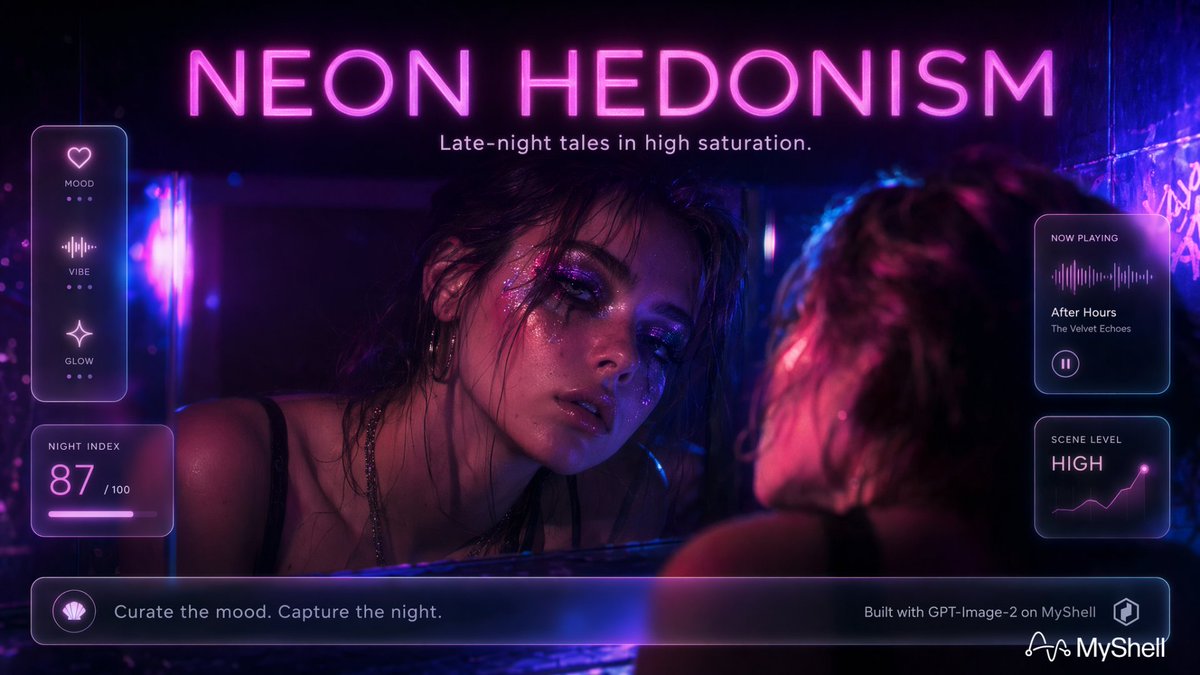
Cyberpunk Neon Nightlife UI Poster — Sora 2 Prompt
PROMPT · EN
type
电影质感霓虹夜生活落地页海报,带有未来感玻璃 UI 覆盖层
aspect_ratio
16:9 宽屏
style
写实赛博朋克编辑风格,高饱和度,深色光泽感的夜店洗手间或后台镜面场景,洋红色与电光蓝灯光,浅景深,光晕,镜头光斑,湿润反射,烟雾缭绕的氛围,高级音乐 App 广告美学
main_text
headline
{argument name="headline text" default="NEON HEDONISM"}
position
顶部居中
appearance
巨大的大写纤细无衬线霓虹灯管字体,热粉色光芒
subheadline
{argument name="subheadline text" default="Late-night tales in high saturation."}
position_detail
位于标题正下方,小型淡粉色无衬线字体
scene
subject
{argument name="main subject" default="a glamorous tired woman in a black strap top leaning toward a mirror"}
composition
女性形象同时出现在右侧前景模糊的背影中,以及左中侧较暗的镜像中;她的脸部部分被阴影遮挡,中心处有一个填充了深紫到栗色渐变的方形隐私模糊/遮挡块
environment
狭窄的霓虹灯光房间,带有光泽的墙壁,镜面,最右侧有紫色的涂鸦式光芒,蓝色垂直光条,皮肤和头发上有洋红色高光
mood
深夜,感性,情绪化,沉浸式,颓废而优雅
ui_overlay
material
带有圆角的透明磨砂玻璃卡片,纤细的紫蓝色轮廓,柔和的内部光晕,微小的白色标签,洋红色数据点缀
total_discrete_ui_components
6
components
item 1
count
1
name
左侧垂直情绪卡片
position
左上方
contents
三行堆叠图标,标签分别为 MOOD、VIBE、GLOW;图标为心形、音频波形和闪光;每一行都有三个小圆点指示器
item 2
count
1
name
夜间指数卡片
position
左中下方
contents
标签 NIGHT INDEX,大数字 87,小字 /100,发光的粉色进度条
item 3
count
1
name
正在播放卡片
position
右中上方
contents
标签 NOW PLAYING,粉色音频波形,曲目名称 After Hours,艺术家 The Velvet Echoes,圆形暂停按钮
item 4
count
1
name
场景等级卡片
position
右中下方
contents
标签 SCENE LEVEL,大字 HIGH,带有发光终点的小型上升折线图
item 5
count
1
name
底部行动号召栏
position
底部全宽,带有边距
contents
左侧贝壳状圆形图标,文字 'Curate the mood. Capture the night.',右侧文字 'Built with GPT-Image-2 on MyShell',小型立方体 Logo
item 6
count
1
name
品牌标识
position
右下角
contents
白色 MyShell Logo 和字标
color_palette
primary
{argument name="primary neon color" default="hot pink magenta"}
secondary
电光蓝和深紫色
background
近乎黑色的靛青色,带有反射的紫色
skin_highlights
粉色和蓝色轮廓光
typography
简洁的未来感无衬线字体,UI 标签采用全大写,宽字间距,清晰易读且带有霓虹光效
rendering_instructions
创作一张精致的宣传主视觉图,保持所有六个 UI 组件清晰且位置精准,强调反射和夜店氛围,保留脸部区域巨大的中心方形隐私遮挡块,不要添加额外的面板或标签

About this prompt

Generate a cinematic, neon-drenched nightlife landing page with a glamorous subject, reflective scenes, and six futuristic glass UI overlays for music or mood apps. Use it as a Concept Art starting point for GPT Image 2: keep the visual structure and style constraints intact, then swap in your own subject, brand, or scene.

This prompt is organized as structured JSON with fields such as type, aspect ratio, style, main text, scene, ui overlay, and color palette. Keeping that hierarchy helps the model separate the subject, layout, interface elements, and detail constraints.

Start with small changes to subject, scene, camera, and color, then generate a few variations to compare composition and detail without turning the page copy into keyword stuffing.

How to use this prompt

  1. Copy the full prompt text and open your preferred AI image model (like Sora 2, DALL-E 3, or Midjourney).
  2. Paste the prompt into the generation field. For variables in {argument} tags, replace them with your custom text or leave the defaults.
  3. Adjust the aspect_ratio if needed (e.g., to 9:16 for vertical). Tweak style keywords (like 'cyberpunk' or 'glamour') to shift the aesthetic.
  4. Generate the image. Review the output and iterate by refining the subject description or UI component details for the perfect result.


FAQ

MyShell.AI

@myshell_ai→

Published
May 15, 2026
Language
EN
Model
GPT Image 2
Category
Concept Art
GPT Image 2Concept Artgpt-image-2twitter
Views
90
Copies
10
Likes
7

Share

More from GPT Image 2

Browse all
Ultra-Realistic 3D Exploded View Prompt: Sony BRAVIA 8K TV

Ultra-Realistic 3D Exploded View Prompt: Sony BRAVIA 8K TV

@Ankit_patel211
Cubist Minimalist Fashion Portrait — Sora 2 Prompt

Cubist Minimalist Fashion Portrait — Sora 2 Prompt

@ChillaiKalan__
Anime Mahjong Win Scene with Yakuza Score UI — Sora 2 Prompt

Anime Mahjong Win Scene with Yakuza Score UI — Sora 2 Prompt

@AI_Ossan

Create faster with Sora2Hub prompts.

Use curated prompt pages as searchable entry points, then jump straight into generation with the right model context.

Explore prompts
