
Sora2 Hub
Sora2 Hub
  • Prompt Library
  • Pricing
  • Showcase
  • Blog
Sora2 Hub
Sora2 Hub
Sora2 Hub

Sora2 Hub

Professional AI creation platform powered by Sora 2, Veo 3.1, and Nano Banana Pro. Create stunning videos and studio-grade images with advanced control, HD quality, and no watermarks.

Email:support@sora2hub.org

AI Video Generator

  • Text to Video
  • Image to Video
  • Veo 3.1
  • Sora 2
  • Kling 3.0
  • Kling 2.6
  • Kling 2.5
  • Runway
  • Wan 2.6
  • Seedance 2.0
  • Hailuo 2.3
  • Grok Imagine
  • HappyHorse-1.0

AI Image Generator

  • Text to Image
  • Image to Image
  • Nano Banana Pro
  • Nano Banana
  • 4o Image
  • Flux Kontext
  • Z Image
  • Seedream 4.5
  • Seedream 5.0 Lite
  • Nano Banana 2
  • GPT Image 2
  • AI Image Upscaler

AI Effects

  • AI Age Filter
  • AI Gender Swap
  • AI Kiss
  • AI Hug
  • Ghibli Image
  • AI Mermaid Filter
  • AI Bodyshake
  • Smiling Filter
  • AI Fat
  • Action Figure

Product

  • Features
  • Showcases
  • Pricing

Company

  • About
  • Contact

© 2025 • Sora2 Hub ORG All rights reserved.

  • Privacy Policy
  • Terms of Service
  • Refund Policy
  1. Home
  2. /
  3. Prompts
  4. /
  5. GPT Image 2
  6. /
  7. iOS App UI Design Prompt: Binance-Style with Custom Function
GPT Image 2AI Prompt

iOS App UI Design Prompt: Binance-Style with Custom Function

Generate a professional, high-fidelity iOS app UI prototype inspired by Binance’s design, tailored to include your specific feature or function.
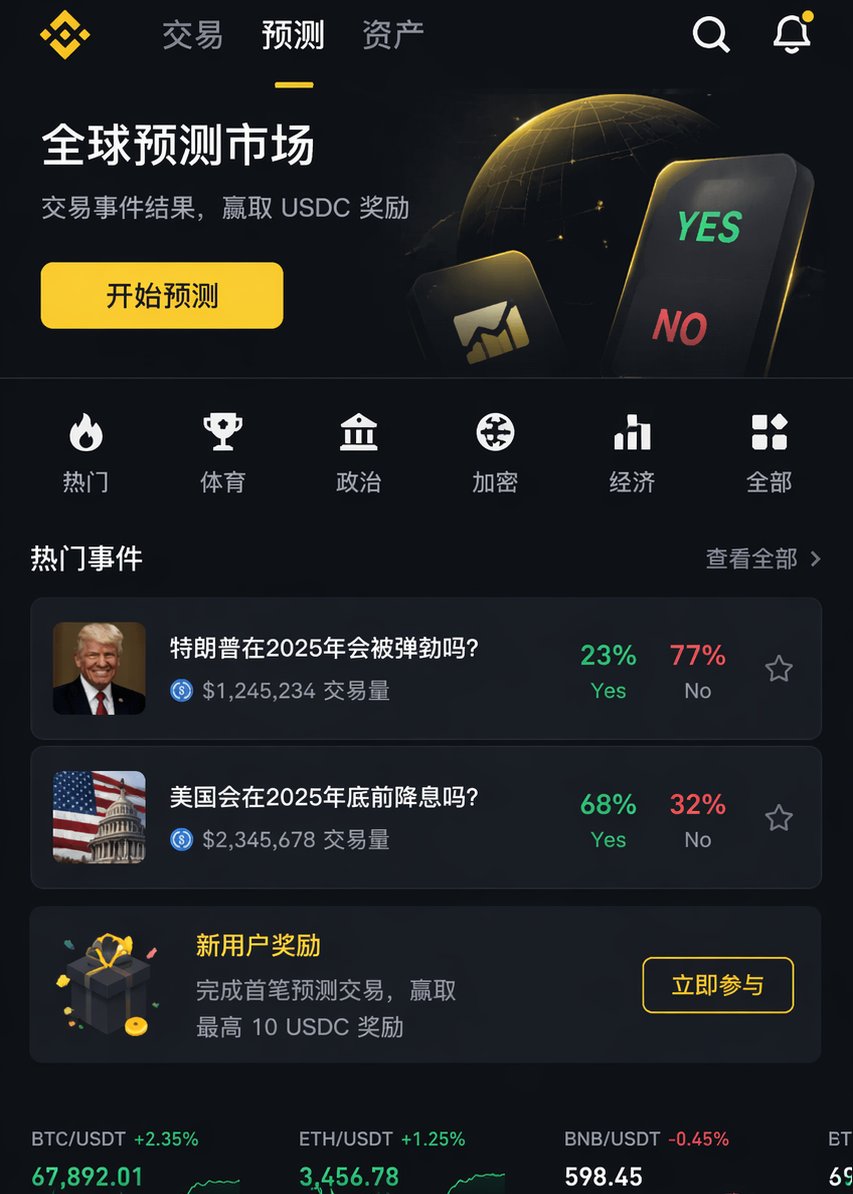
iOS App UI Design Prompt: Binance-Style with Custom Function
PROMPT · EN
渲染一张专业的 iOS APP 页面图像,风格类似于 argreference platform: Binance,但内容需包含 argfunction: XX 功能。要求具备专业级设计水准。

About this prompt

Generate a professional, high-fidelity iOS app UI prototype inspired by Binance’s design, tailored to include your specific feature or function. Use it as a Concept Art starting point for GPT Image 2: keep the visual structure and style constraints intact, then swap in your own subject, brand, or scene.

Start by replacing reference platform and function, then keep the camera, composition, and material cues in the same order. This makes the output easier to compare across variations.

How to use this prompt

  1. Copy the prompt above.
  2. Open your AI image generation tool (e.g., Sora 2, Midjourney, Stable Diffusion).
  3. Replace {reference platform} with a platform whose design you admire (default: Binance) and {function} with the specific feature you want to showcase (e.g., "crypto wallet").
  4. Run the generation to receive your professional iOS app UI mockup.
  5. Adjust the arguments or add details (like color scheme, layout) for refined results.

FAQ

AB Kuai.Dong

@_FORAB→

Published
Apr 25, 2026
Language
EN
Model
GPT Image 2
Category
Concept Art
GPT Image 2Concept Artgpt-image-2twitter
Views
1.2K
Copies
168
Likes
64

Share

More from GPT Image 2

Browse all
Cyberpunk Catgirl Soda Splash — Sora 2 Prompt

Cyberpunk Catgirl Soda Splash — Sora 2 Prompt

@kuso_seisakusyo
Cyberpunk AI Launch Banner — Cinematic Neon Poster Prompt

Cyberpunk AI Launch Banner — Cinematic Neon Poster Prompt

@ObieriI
Photorealistic Fashion Magazine Cover — Sora 2 Prompt

Photorealistic Fashion Magazine Cover — Sora 2 Prompt

@aichof21

Create faster with Sora2Hub prompts.

Use curated prompt pages as searchable entry points, then jump straight into generation with the right model context.

Explore prompts

