
University Campus Aerial Drone Photo — Sora 2 Prompt
Generate a stunning, realistic aerial photograph of a sprawling university campus complete with iconic landmarks, entrance gates, and a panoramic city skyline backdrop.
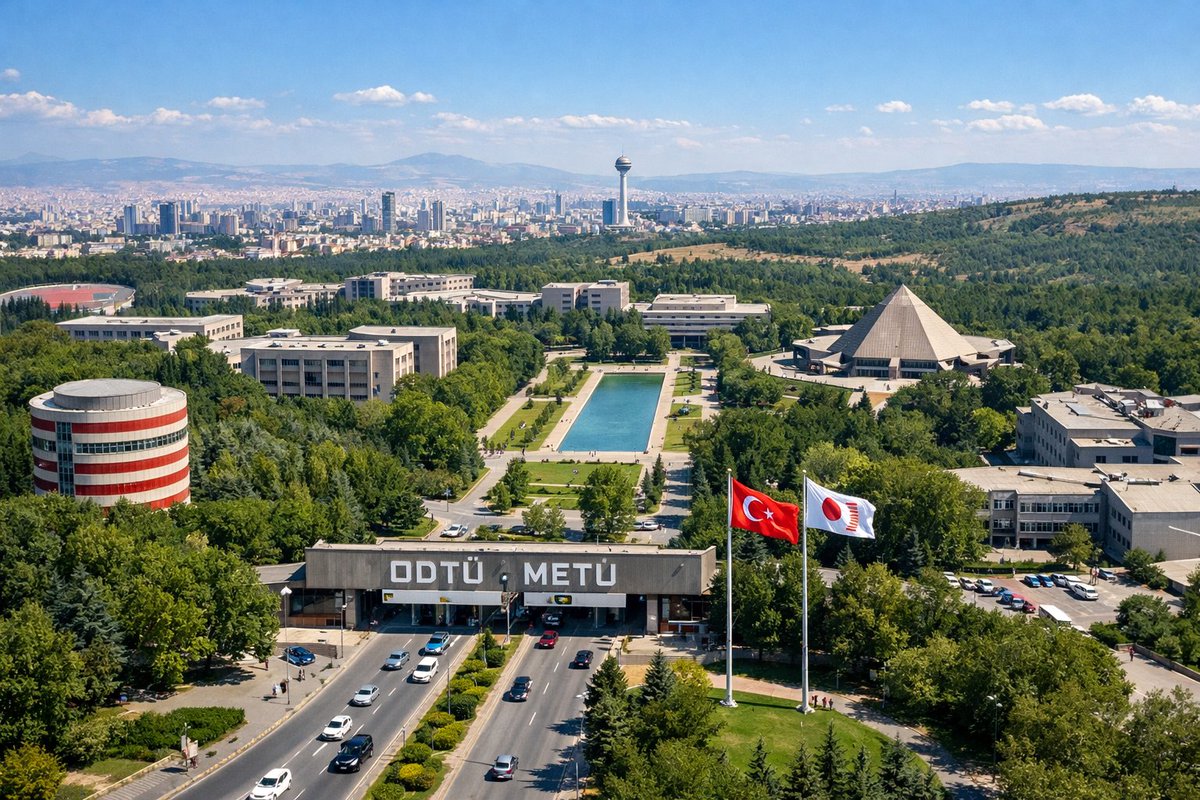
An aerial drone photograph of a sprawling, lush green university campus on a sunny day. In the foreground, a wide multi-lane road with cars passes through a large concrete entrance gate bearing the large white text "arguniversity name: ODTÜ METÜ". To the right of the gate, two tall flagpoles fly a argflag 1: Turkish flag and a argflag 2: white flag with a red circular logo. The midground features a long rectangular reflecting pool surrounded by green lawns and pedestrian paths, flanked by various modernist concrete academic buildings. Notable structures include a cylindrical building with red and white horizontal stripes on the left and a large pyramid-shaped building on the right. In the background, a dense city skyline representing argcity skyline: Ankara stretches across the horizon, featuring a prominent tall observation tower, backed by rolling hills and mountains under a clear blue sky with scattered white clouds.
About this prompt
Generate a stunning, realistic aerial photograph of a sprawling university campus complete with iconic landmarks, entrance gates, and a panoramic city skyline backdrop. Use it as a Concept Art starting point for GPT Image 2: keep the visual structure and style constraints intact, then swap in your own subject, brand, or scene.
Common directions include gptimage2api prompts, gptimage2api, and en. Treat these tags as creative cues; the prompt structure and preview image are the more useful guide.
Start by replacing university name, flag 1, flag 2, and city skyline, then keep the camera, composition, and material cues in the same order. This makes the output easier to compare across variations.
How to use this prompt
- Copy the Prompt: Copy the entire prompt text above.
- Choose an AI Model: Paste it into a compatible AI video or image generator like Sora 2 or similar.
- Customize Variables: Click or edit the argument fields (e.g., university name, flags, city skyline) to match your desired institution.
- Generate: Run the prompt to create your image or video.
- Refine (Optional): Adjust details like weather, time of day, or camera angle for a perfect result.


