
GPT Image 2AIプロンプト
3D Film-Style Animal Office Handshake — Sora 2 Prompt
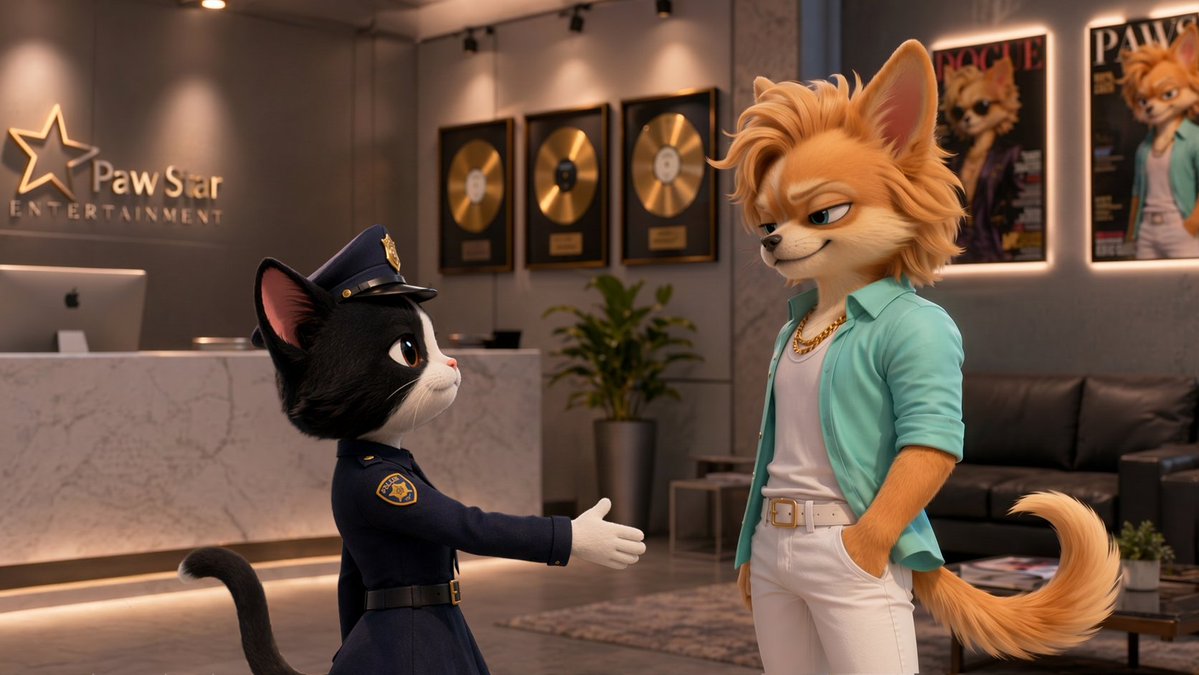
Create a cinematic 3D animation of a handshake between a cat officer and a sly fox in a luxury office, complete with customizable outfits and realistic fur textures.
プロンプト · EN
一个高质量的 3D 动画电影镜头,画面中一位 argleft character: 黑白燕尾服猫警官 伸出戴着白手套的手,正准备与一位高挑的 argright character: 时尚拟人化金发狐狸 握手。狐狸嘴角带着一丝坏笑,一只手插在口袋里,身穿 argfox outfit: 白色 T 恤外搭青色开衫、白色长裤,并佩戴一条金项链。他们站在一个现代化的豪华办公大厅中。左侧墙壁上,一个金属质感的 3D 星形标志写着 "argcompany name: Paw Star ENTERTAINMENT",下方是一个时尚的前台接待处。背景中设有黑色真皮沙发、盆栽植物以及墙面装饰,包括 argbackground decor: 3 张镶框金唱片和 2 张印有狐狸形象的镶框海报。画面呈现出细腻的毛发质感、逼真的衣物材质,以及现代动画长片中常见的柔和专业摄影棚灯光。
このプロンプトについて
Create a cinematic 3D animation of a handshake between a cat officer and a sly fox in a luxury office, complete with customizable outfits and realistic fur textures. Use it as a コンセプトアート starting point for GPT Image 2: keep the visual structure and style constraints intact, then swap in your own subject, brand, or scene.
Start by replacing left character, right character, fox outfit, and company name, then keep the camera, composition, and material cues in the same order. This makes the output easier to compare across variations.
このプロンプトの使い方
- Copy the prompt text provided.
- Paste it into your AI video generation tool (e.g., Sora 2, Runway, Kling).
- Replace the highlighted variables (e.g.,
{left character},{fox outfit}) with your own details. - Adjust lighting or camera angles if needed, then generate.
- Iterate for the perfect shot.


