Sora2 Hub
Sora2 Hub
  • プロンプトライブラリ
  • 料金
  • ショーケース
Sora2 Hub
Sora2 Hub
Sora2 Hub

Sora2 Hub

Sora 2、Veo 3.1、Nano Banana Proを搭載したプロフェッショナルAI制作プラットフォーム。高度な制御、HD画質、透かしなしで、魅力的な動画とスタジオ品質の画像を作成できます。

Email:support@sora2hub.org

AI動画生成

  • テキストから動画
  • 画像から動画
  • Veo 3.1
  • Sora 2
  • Kling 3.0
  • Kling 2.6
  • Kling 2.5
  • Runway
  • Wan 2.6
  • Seedance 2.0
  • Hailuo 2.3
  • Grok Imagine
  • HappyHorse-1.0
  • HappyHorse 1.1
  • Kling 3.0 Turbo
  • Volcengine Video-to-Video Lip Sync
  • OmniHuman 1.5
  • Grok Imagine Video 1.5
  • Gemini Omni
  • Wan 2.7 Video
  • Seedance 2.0 Mini

AI画像生成

  • テキストから画像
  • 画像から画像
  • Nano Banana Pro
  • Nano Banana
  • 4o Image
  • Flux Kontext
  • Z Image
  • Seedream 4.5
  • Seedream 5.0 Lite
  • Nano Banana 2
  • GPT Image 2
  • AI画像アップスケーラー
  • Seedream 5.0 Pro
  • Nano Banana 2 Lite
  • Qwen Image 2.0

AIエフェクト

  • AI年齢フィルター
  • AI性別変換
  • AIキス
  • AIハグ
  • ジブリ画像
  • AI人魚フィルター
  • AIボディシェイク
  • スマイルフィルター
  • AI太る
  • アクションフィギュア

製品

  • 機能
  • ショーケース
  • 価格

会社情報

  • 会社概要
  • お問い合わせ

© 2025 • Sora2 Hub ORG All rights reserved.

  • プライバシーポリシー
  • 利用規約
  • 返金ポリシー
  1. ホーム
  2. /
  3. プロンプト
  4. /
  5. GPT Image 2
  6. /
  7. Voxel Boss Battle HUD Screenshot — Customizable AI Prompt
GPT Image 2AIプロンプト

Voxel Boss Battle HUD Screenshot — Customizable AI Prompt

Generate a detailed first-person voxel game screenshot with multiple bosses, a rich HUD overlay, and fully customizable UI elements for game concept art.
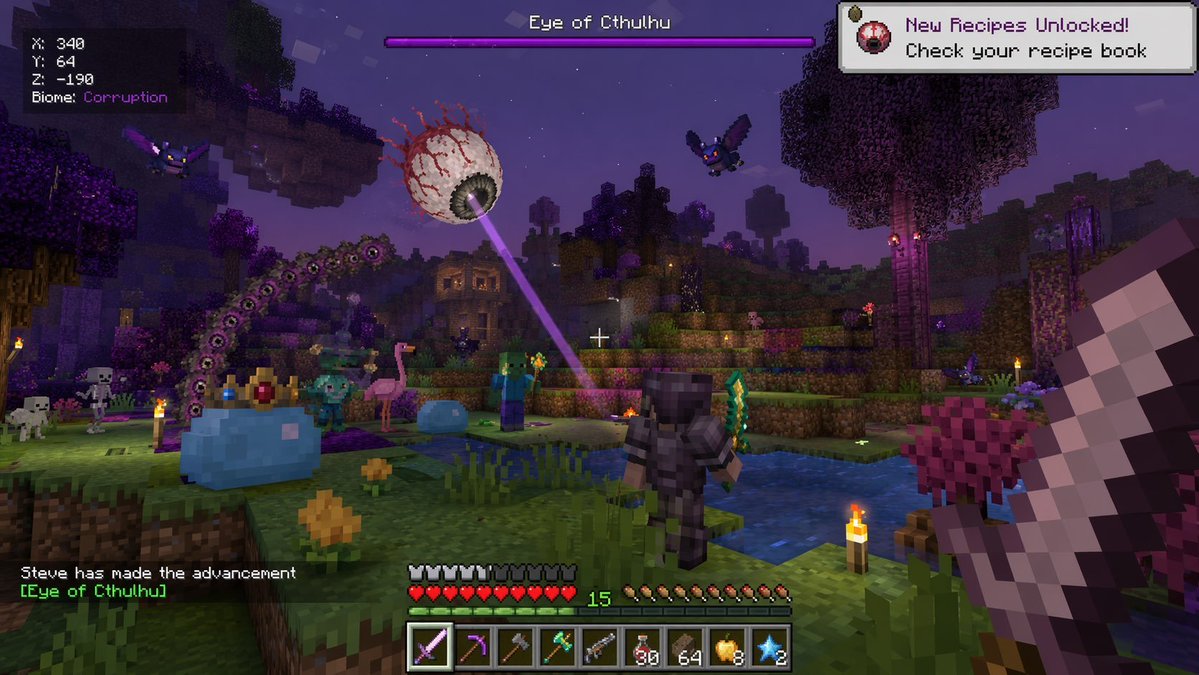
Voxel Boss Battle HUD Screenshot — Customizable AI Prompt
プロンプト · EN
type
第一人称电子游戏截图
setting
夜晚的方块体素世界,带有深色水域和发光火把的紫色腐化生物群系
entities
item 1
1 个发射紫色激光的巨型浮空眼球 Boss
item 2
1 个戴着金冠的巨型蓝色史莱姆 Boss
item 3
1 个巨型紫色分节蠕虫怪物
item 4
1 个身穿深色盔甲、手持绿色长剑的玩家角色
item 5
2 个飞行的紫色蝙蝠怪物
item 6
2 个方块僵尸
item 7
2 个方块骷髅
item 8
1 只粉色火烈鸟
item 9
1 只小型蓝色史莱姆
perspective
第一人称,右侧手持一把大型像素化长剑,中心有白色准星
ui_elements
item 1
position
左上角
text
X: 340 Y: 64 Z: -190 生物群系: {argument name="biome" default="Corruption"}
item 2
position
顶部中央
text
{argument name="boss name" default="Eye of Cthulhu"}
description
紫色 Boss 血条
item 3
position
右上角
text
已解锁新配方!请查看你的配方书
icon
小型浮空眼球
item 4
position
左下角
text
{argument name="player name" default="Steve"} 达成了成就 [{argument name="boss name" default="Eye of Cthulhu"}]
item 5
position
底部中央
description
HUD 包含 10 颗红色心形生命值、10 个饥饿鸡腿、绿色经验值 15 以及 9 格快捷栏
hotbar_items
item 1
紫色长剑
item 2
镐
item 3
斧
item 4
绿色武器
item 5
枪
item 6
30 瓶红色药水
item 7
64 个棕色方块
item 8
8 个金苹果
item 9
2 颗蓝色星星

このプロンプトについて

Generate a detailed first-person voxel game screenshot with multiple bosses, a rich HUD overlay, and fully customizable UI elements for game concept art. Use it as a コンセプトアート starting point for GPT Image 2: keep the visual structure and style constraints intact, then swap in your own subject, brand, or scene.

This prompt is organized as structured JSON with fields such as type, setting, entities, perspective, and ui elements. Keeping that hierarchy helps the model separate the subject, layout, interface elements, and detail constraints.

Start with small changes to subject, scene, camera, and color, then generate a few variations to compare composition and detail without turning the page copy into keyword stuffing.

このプロンプトの使い方

  1. Copy the prompt from this page.
  2. Paste into an AI image/video generator like Sora 2.
  3. Modify variables (player name, boss name, biome) inside the curly braces as desired.
  4. Generate the image and tweak settings for optimal results.
  5. Use as inspiration, prototyping, or placeholders for game projects.
FAQ

只の人。

@aibi0123→

公開日
2026年4月25日
元の言語
EN
モデル
GPT Image 2
カテゴリ
コンセプトアート
GPT Image 2コンセプトアートgpt-image-2twitter
閲覧
3.3K
コピー
432
いいね
76

共有

GPT Image 2 のその他

すべて見る
Sleeping Anime Star Witch — Dreamy Cosmic Sora 2 Prompt

Sleeping Anime Star Witch — Dreamy Cosmic Sora 2 Prompt

@prompts
Graphic Novel Ink Splash Portrait — Sora 2 Prompt

Graphic Novel Ink Splash Portrait — Sora 2 Prompt

@iamsofiaijaz
Anime Schoolgirls Sharing Transparent Umbrella — Sora 2 Prompt

Anime Schoolgirls Sharing Transparent Umbrella — Sora 2 Prompt

@yB7CqdfoDmrbhgD

Sora2Hubプロンプトで制作を速く。

検索できるプロンプトページから始め、適切なモデル文脈のまま生成へ進めます。

プロンプトを探す