
GPT Image 2AIプロンプト
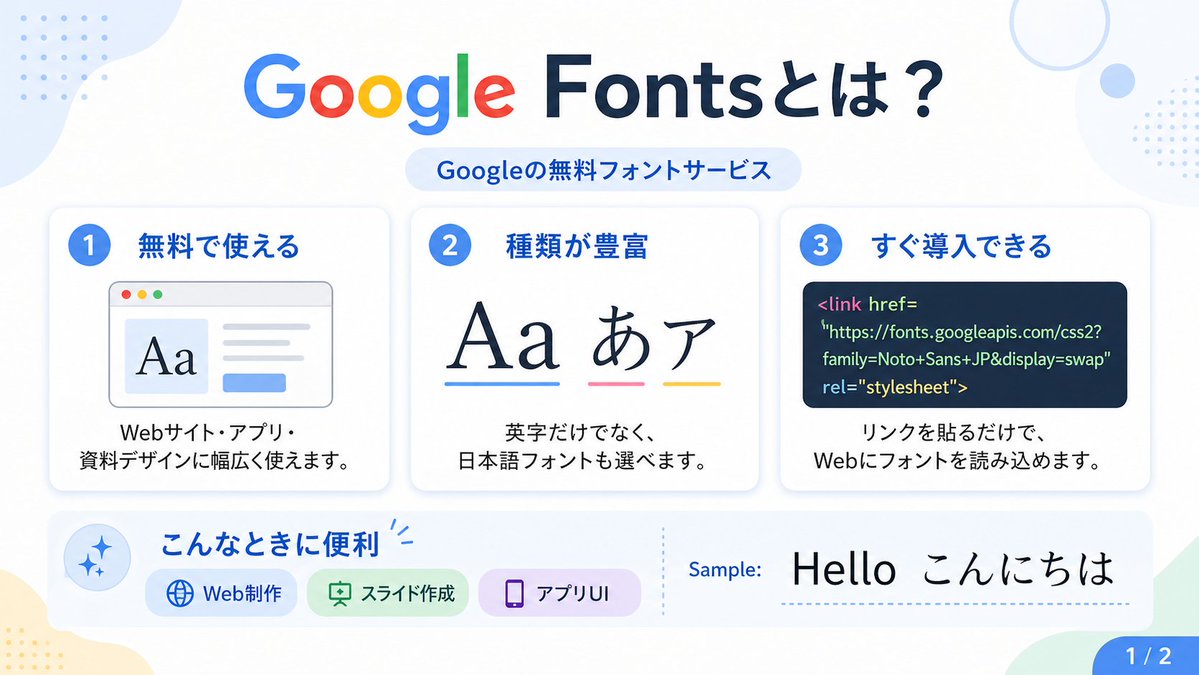
Google Fonts 日语信息图海报 — 现代扁平设计提示
此提示生成一份简洁、扁平风格的日语信息图海报,用于介绍 Google Fonts,适用于社交媒体、幻灯片或教育设计项目。
プロンプト · EN
type
日语信息图海报topic
Google Fonts 介绍style
look
简洁扁平的现代演示幻灯片palette
白色背景,搭配柔和的淡蓝色、绿色、黄色和薰衣草色点缀aspect_ratio
16:9lighting
明亮均匀的数字图形光效finish
清晰的矢量风格信息图,带有细腻的阴影和圆角卡片text
headline
{argument name="headline text" default="什么是 Google Fonts?"}subheadline
Google 的免费字体服务sample_label
示例:sample_text
{argument name="sample text" default="Hello こんにちは"}page_indicator
1 / 2layout
sections
item 1
title
顶部标题position
顶部居中count
2labels
item 1
什么是 Google Fonts?item 2
Google 的免费字体服务item 2
title
功能卡片position
中间行count
3labels
item 1
1 免费使用item 2
2 种类丰富item 3
3 快速部署item 3
title
使用场景栏position
左下至中心count
4labels
item 1
适用场景item 2
Web 制作item 3
Slides 制作item 4
应用 UIitem 4
title
示例区域position
右下count
2labels
item 1
示例:item 2
Hello こんにちはitem 5
title
页面标记position
右下角count
1labels
item 1
1 / 2background_decorations
count
7items
item 1
左上角淡蓝色有机形状色块item 2
左上角蓝色小点阵网格item 3
右上角淡蓝色细圆环item 4
右上角附近淡蓝色小圆点item 5
右上边缘蓝色小点阵网格item 6
左下角淡黄色有机形状色块item 7
右下角淡绿色角形形状cards
item 1
number
1title
免费使用description
可广泛应用于网站、应用及演示文稿设计。visual
带有轻微阴影的圆角白色卡片,配有蓝色数字徽章,浏览器窗口插图左侧显示大号衬线体 Aa,右侧为灰色文本行,下方有一个蓝色小按钮item 2
number
2title
种类丰富description
不仅有英文字体,还可以选择日语字体。visual
带有轻微阴影的圆角白色卡片,配有蓝色数字徽章,显示大号排版示例 Aa あ ア,下方分别带有蓝色、粉色和黄色的下划线item 3
number
3title
快速部署description
只需添加链接,即可在 Web 上加载字体。visual
带有轻微阴影的圆角白色卡片,配有蓝色数字徽章,深海军蓝代码面板包含 Google Fonts 的 HTML 链接标签lower_band
left_icon
淡蓝色圆圈内的蓝色闪光图标title
适用场景chips
count
3items
item 1
label
Web 制作color
浅蓝色icon
globeitem 2
label
Slides 制作color
浅绿色icon
presentation boarditem 3
label
应用 UIcolor
浅紫色icon
smartphonedivider
垂直虚线sample_preview
白色背景上的大号黑色排版示例typography
headline_font
{argument name="headline font" default="类似 Google Sans 的圆角无衬线字体"}body_font
{argument name="body font" default="简洁的日语无衬线字体"}notes
标题中的 Google 一词使用官方多色 Google Logo 样式:蓝色 G、红色 o、黄色 o、蓝色 g、绿色 l、红色 e;标题其余部分为深海军蓝。このプロンプトについて
此提示生成一份简洁、扁平风格的日语信息图海报,用于介绍 Google Fonts,适用于社交媒体、幻灯片或教育设计项目。 Use it as a コンセプトアート starting point for GPT Image 2: keep the visual structure and style constraints intact, then swap in your own subject, brand, or scene.
This prompt is organized as structured JSON with fields such as type, topic, style, text, layout, cards, and lower band. Keeping that hierarchy helps the model separate the subject, layout, interface elements, and detail constraints.
Start with small changes to subject, scene, camera, and color, then generate a few variations to compare composition and detail without turning the page copy into keyword stuffing.
このプロンプトの使い方
- 将整个提示文本复制到您的 AI 图像生成模型中。
- 选择一个能够理解详细布局和样式指令的模型。
- 根据需要调整变量,例如
headline text或sample text,以定制内容。 - 生成图像,模型将输出一个 16:9 的矢量风格信息图。


