
GPT Image 2AIプロンプト
MPLUS Link Modern UI Redesign — 6-Screen SaaS Prototype
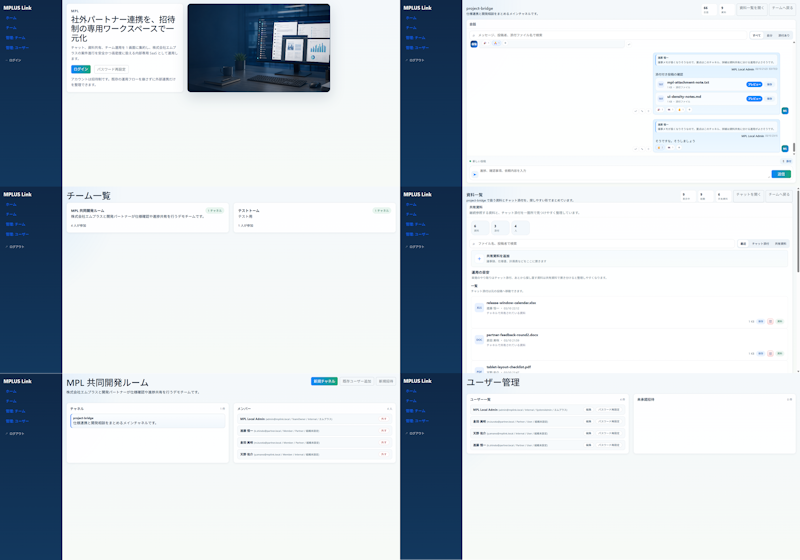
Generate a clean, modern six-screen UI redesign for a Japanese enterprise SaaS collaboration tool with spacious layouts and soft styling.
プロンプト · EN
以 REFERENCE_0 作为源 UI,将类似 Teams 的内部/外部协作系统重新设计为更简洁、更现代的产品模型,同时保留 MPLUS Link 品牌、深蓝色左侧导航栏以及整体应用功能。制作一个精致的 2 列 3 行演示,展示 6 个重新设计的屏幕:1) 带有大型主视觉卡片、日语标题 argheadline text: 社外パートナー連携を、招待制の専用ワークスペースで一元化、登录选项卡/按钮以及逼真的桌面显示器主视觉图像的欢迎/登录落地页;2) 带有右对齐聊天卡片、操作芯片和消息编辑器的项目桥接聊天屏幕;3) 简化为两个简洁团队卡片的团队列表屏幕;4) 带有上传控件、搜索/筛选区域和文件行的资料/文档列表屏幕;5) 标题为 argroom title: MPI 共同開発ルーム 的共享协作室屏幕,包含项目概览卡片和紧凑的成员/状态列表;6) 标题为 argadmin title: ユーザー管理 的用户管理屏幕,包含用户行和空白详情面板。使新模型比参考图更宽敞:减少表格行数、增加边距、使用更柔和的分隔线、淡蓝灰色背景、白色圆角卡片、细腻的阴影以及小巧的蓝/绿色强调按钮。保持日本企业级 SaaS 的质感和虚拟数据属性,但去除密集且琐碎的表格,取而代之以适合设计改进对比的简化、美观的 UI 模型。在侧边栏中使用品牌名称 argbrand name: MPLUS Link,确保侧边栏在每个屏幕上保持一致,并避免添加无关功能、水印或装饰性杂物。
このプロンプトについて
Generate a clean, modern six-screen UI redesign for a Japanese enterprise SaaS collaboration tool with spacious layouts and soft styling. Use it as a コンセプトアート starting point for GPT Image 2: keep the visual structure and style constraints intact, then swap in your own subject, brand, or scene.
Start by replacing headline text, room title, admin title, and brand name, then keep the camera, composition, and material cues in the same order. This makes the output easier to compare across variations.
このプロンプトの使い方
- Copy the full prompt text above.
- Choose an AI model like GPT-4, Claude, or Midjourney v6.
- Replace the default Japanese text in curly braces with your own brand name, room title, or headline.
- Paste into your model and generate the 2×3 grid image.
- Adjust variables or style keywords to refine the result.


