
GPT Image 2AIプロンプト
Poster Layout Hack: Flip Portrait, Add Eras — Sora 2 Prompt
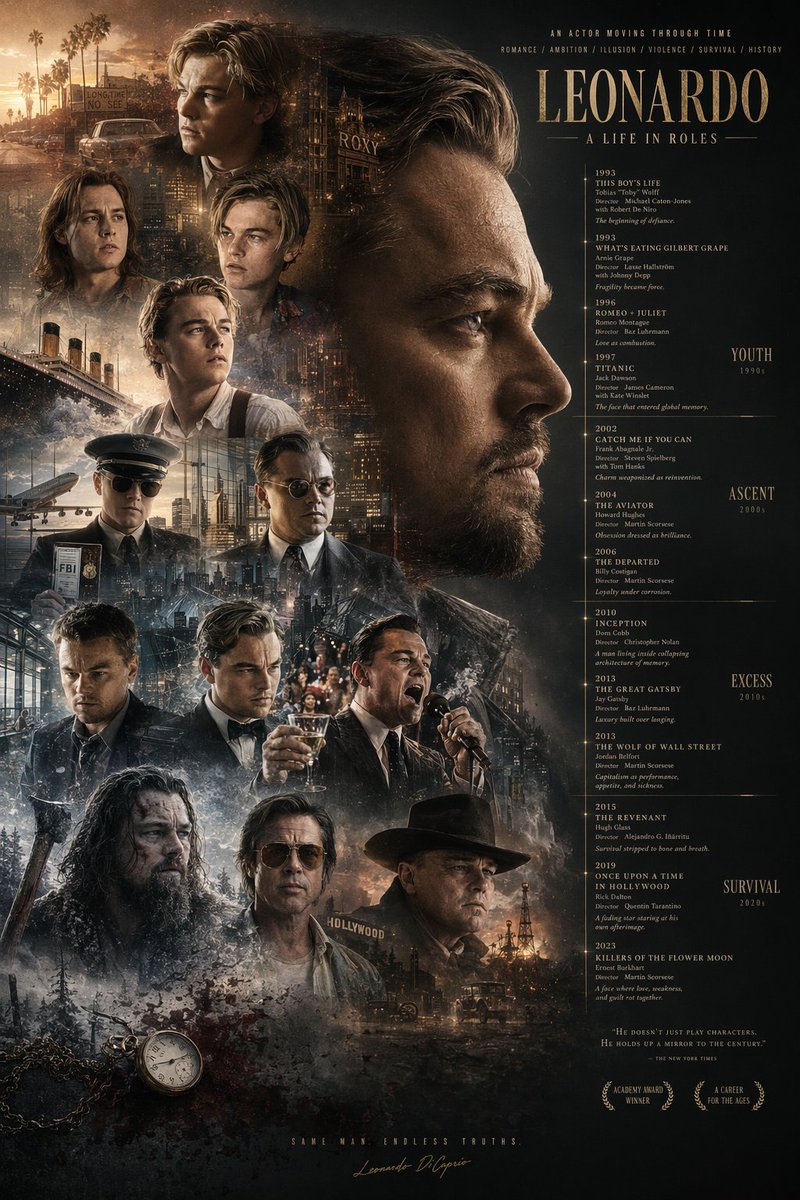
Effortlessly redesign any poster into a rich montage with flipped portraits, era labels, iconic background props, plus a pocket watch and blood.
プロンプト · EN
使用提供的参考图像,对海报布局进行重组。将主标题 argmain title: LEONARDO A LIFE IN ROLES 移至右上角。将中央的大幅侧面肖像移至右上象限,并将其水平翻转使其朝向右侧。将时间轴文本重新定位到右侧,并在最右侧添加 4 个新的时代分类:argera categories: YOUTH 1990s, ASCENT 2000s, EXCESS 2010s, SURVIVAL 2020s。在左侧和底部聚拢 13 个较小的角色肖像。在这些肖像后方整合新的背景元素:argbackground elements: Titanic ship, airplane, cityscapes, Hollywood sign, oil derrick。在左下角添加一个 argadded objects: pocket watch with chain and blood splatters。更新底部文本,加入 2 个月桂花环图标以及标语 argbottom tagline: SAME MAN. ENDLESS TRUTHS.。
このプロンプトについて
Effortlessly redesign any poster into a rich montage with flipped portraits, era labels, iconic background props, plus a pocket watch and blood. Use it as a コンセプトアート starting point for GPT Image 2: keep the visual structure and style constraints intact, then swap in your own subject, brand, or scene.
Start by replacing main title, era categories, background elements, and added objects, then keep the camera, composition, and material cues in the same order. This makes the output easier to compare across variations.
このプロンプトの使い方
- Copy the prompt text provided.
- Customize the placeholder values: main title, era categories, background elements, added objects, and bottom tagline.
- Upload a reference poster image as input if using an image-to-image model.
- Select a suitable AI model for image editing, such as Sora 2 or Stable Diffusion.
- Generate the output and experiment with different seeds for varied compositions.


