
Sora2 Hub
Sora2 Hub
  • Prompt Library
  • Pricing
  • Showcase
  • Blog
Sora2 Hub
Sora2 Hub
Sora2 Hub

Sora2 Hub

Professional AI creation platform powered by Sora 2, Veo 3.1, and Nano Banana Pro. Create stunning videos and studio-grade images with advanced control, HD quality, and no watermarks.

Email:support@sora2hub.org

AI Video Generator

  • Text to Video
  • Image to Video
  • Veo 3.1
  • Sora 2
  • Kling 3.0
  • Kling 2.6
  • Kling 2.5
  • Runway
  • Wan 2.6
  • Seedance 2.0
  • Hailuo 2.3
  • Grok Imagine
  • HappyHorse-1.0

AI Image Generator

  • Text to Image
  • Image to Image
  • Nano Banana Pro
  • Nano Banana
  • 4o Image
  • Flux Kontext
  • Z Image
  • Seedream 4.5
  • Seedream 5.0 Lite
  • Nano Banana 2
  • GPT Image 2
  • AI Image Upscaler

AI Effects

  • AI Age Filter
  • AI Gender Swap
  • AI Kiss
  • AI Hug
  • Ghibli Image
  • AI Mermaid Filter
  • AI Bodyshake
  • Smiling Filter
  • AI Fat
  • Action Figure

Product

  • Features
  • Showcases
  • Pricing

Company

  • About
  • Contact

© 2025 • Sora2 Hub ORG All rights reserved.

  • Privacy Policy
  • Terms of Service
  • Refund Policy
  1. Home
  2. /
  3. Prompts
  4. /
  5. GPT Image 2
  6. /
  7. Futuristic Neon Adobe Creative Cloud Banner — Sora 2 Prompt
GPT Image 2AI Prompt

Futuristic Neon Adobe Creative Cloud Banner — Sora 2 Prompt

Generate a sleek, futuristic neon banner showcasing Adobe Creative Cloud and its seven core apps, perfect for modern software advertisements or hero visuals.
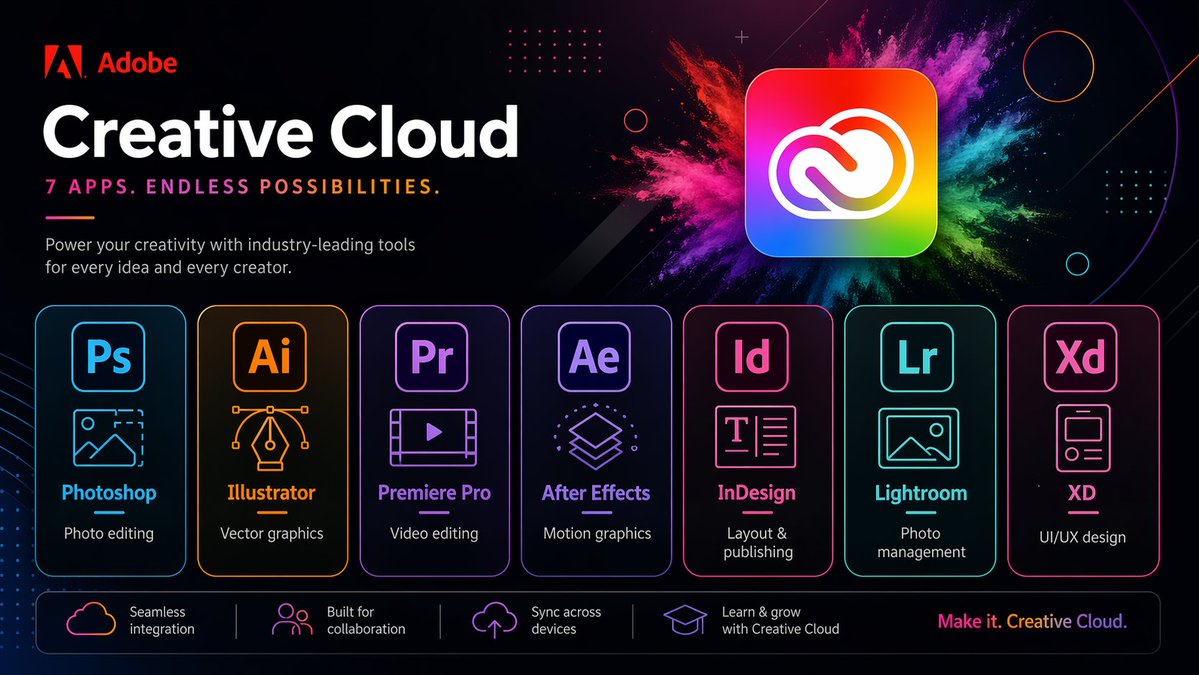
Futuristic Neon Adobe Creative Cloud Banner — Sora 2 Prompt
PROMPT · EN
type
软件促销横幅
brand
name
Adobe
logoPosition
左上角
scene
style
时尚未来感科技广告,深色模式,光泽霓虹 UI,高对比度,高级营销视觉图
background
深黑至深海军蓝渐变,带有淡淡的对角线、微妙的光晕、点阵网格装饰、细圆轮廓、微小火花粒子及抽象几何叠加层
accentEffect
主应用图标后方有大型多色粉末爆炸效果,融合了洋红色、粉色、紫色、蓝色、青色、绿色和黄色
text
headline
Creative Cloud
subheadline
7 款应用。无限可能。
body
利用行业领先的工具为您的每一个创意和创作者赋能。
footerTagline
创造无限。Creative Cloud。
layout
sections
item 1
title
顶部品牌区
position
左上角
count
3
labels
item 1
Adobe 标志
item 2
Creative Cloud
item 3
7 款应用。无限可能。
item 2
title
主应用展示
position
中心至右上角
count
1
labels
item 1
Creative Cloud 图标
item 3
title
应用卡片
position
中间行
count
7
labels
item 1
Photoshop
item 2
Illustrator
item 3
Premiere Pro
item 4
After Effects
item 5
InDesign
item 6
Lightroom
item 7
XD
item 4
title
功能栏
position
底部
count
4
labels
item 1
无缝集成
item 2
专为协作打造
item 3
跨设备同步
item 4
通过 Creative Cloud 学习与成长
appCardArrangement
七张均匀分布的圆角矩形卡片,横向排列在下方中部
footerTaglinePosition
右下角
objects
mainIcon
shape
圆角方形应用图标
colors
彩虹渐变填充,配以白色 Creative Cloud 标志
position
中心右上角
glow
柔和外发光
appCards
item 1
code
Ps
name
Photoshop
borderColor
电光蓝
icon
带有山脉和虚线裁剪角的图像框
description
照片编辑
item 2
code
Ai
name
Illustrator
borderColor
橙色
icon
带有贝塞尔曲线手柄的矢量钢笔尖
description
矢量图形
item 3
code
Pr
name
Premiere Pro
borderColor
紫罗兰色
icon
带有播放按钮的视频帧
description
视频编辑
item 4
code
Ae
name
After Effects
borderColor
紫色
icon
堆叠的动态图形层
description
动态图形
item 5
code
Id
name
InDesign
borderColor
亮粉色
icon
文本排版页面
description
排版与出版
item 6
code
Lr
name
Lightroom
borderColor
青色
icon
照片风景框
description
照片管理
item 7
code
Xd
name
XD
borderColor
粉色
icon
移动应用线框卡片
description
UI/UX 设计
featureBar
item 1
icon
云朵轮廓
text
无缝集成
item 2
icon
人群图标
text
专为协作打造
item 3
icon
上传至云端
text
跨设备同步
item 4
icon
学士帽
text
通过 Creative Cloud 学习与成长
rendering
camera
正视平面海报视角
composition
简洁居中的商业布局
lighting
霓虹边缘光和柔和光晕
finish
清晰的矢量文本混合效果,精致的广告宣传美学,超锐利排版

About this prompt

Generate a sleek, futuristic neon banner showcasing Adobe Creative Cloud and its seven core apps, perfect for modern software advertisements or hero visuals. Use it as a Concept Art starting point for GPT Image 2: keep the visual structure and style constraints intact, then swap in your own subject, brand, or scene.

This prompt is organized as structured JSON with fields such as type, brand, scene, text, layout, objects, and rendering. Keeping that hierarchy helps the model separate the subject, layout, interface elements, and detail constraints.

Start with small changes to subject, scene, camera, and color, then generate a few variations to compare composition and detail without turning the page copy into keyword stuffing.

How to use this prompt

  1. Copy the provided prompt into your AI image generator (like DALL·E 3, Midjourney, or Sora).
  2. If using a model that supports additional parameters, adjust settings like aspect ratio to 16:9 for a wide banner.
  3. Optionally modify the accent colors or app names to match your own software suite.
  4. Generate and select the best variation for your marketing material.

FAQ

LudovicCreator

@LudovicCreator→

Published
Apr 25, 2026
Language
EN
Model
GPT Image 2
Category
Concept Art
GPT Image 2Concept Artgpt-image-2twitter
Views
488
Copies
31
Likes
31

Share

More from GPT Image 2

Browse all
AI-Generated Crossover Fighter Screenshot — Sora 2 Prompt

AI-Generated Crossover Fighter Screenshot — Sora 2 Prompt

@momoringo_sub
Gothic Anime Girl with Hidden Face — Sora 2 Prompt

Gothic Anime Girl with Hidden Face — Sora 2 Prompt

@hoshi122221
Photorealistic Fashion Magazine Cover — Sora 2 Prompt

Photorealistic Fashion Magazine Cover — Sora 2 Prompt

@aichof21

Create faster with Sora2Hub prompts.

Use curated prompt pages as searchable entry points, then jump straight into generation with the right model context.

Explore prompts

