
GPT Image 2AI Prompt
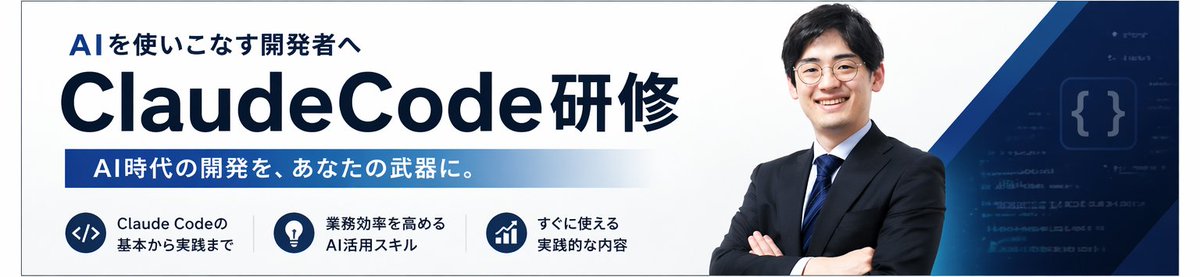
Japanese AI Coding Course Banner — AI Image Prompt
Generate a professional Japanese corporate training banner for AI programming courses, featuring clean design, navy blue branding, and customizable text.
PROMPT · EN
创建一个简洁的日语企业培训横幅,采用宽横幅网页页眉格式,背景为白色,并配以深海军蓝品牌色。布局为一个统一的 AI 编程课程促销横幅。在左侧,放置一个醒目的粗体日语小标题“AI を使いこなす開発者へ”,其下方是一个非常醒目的大标题“argmain title: ClaudeCode 研修”,采用粗体无衬线深海军蓝字体,其中“ClaudeCode”字号特别大,末尾的日语单词以相同风格紧随其后。在标题下方,添加一条从深蓝到浅蓝的水平渐变长条,内含白色粗体日语文字:“argsubheadline text: AI 时代的开发,成为你的利器。”。在左下角,横向排列 3 个圆形海军蓝图标徽章,每个图标右侧配有简短的两行日语说明。徽章 1 显示代码符号 </>,文字为“Claude Code 的基本から実践まで”。徽章 2 显示灯泡图标,文字为“业务效率を高める AI 活用技能”。徽章 3 显示向上趋势图,文字为“すぐに使える実践的な内容”。在右半部分,放置一位自信的日本商务人士半身像,双臂交叉,身着深海军蓝西装、白衬衫和蓝条纹领带,面向前方;其面部经过柔焦或匿名化处理。在他身后,添加从右上角和右下角扫过的分层几何海军蓝与蓝色斜线形状,以及一个带有淡代码行和发光花括号 {} 的深蓝色科技主题面板。采用精致的 B2B 研讨会广告风格,排版清晰,留白充裕,运用微妙的渐变,对比度高,营造出专业的 AI/工程培训氛围。
About this prompt
Generate a professional Japanese corporate training banner for AI programming courses, featuring clean design, navy blue branding, and customizable text. Use it as a Concept Art starting point for GPT Image 2: keep the visual structure and style constraints intact, then swap in your own subject, brand, or scene.
Start by replacing main title and subheadline text, then keep the camera, composition, and material cues in the same order. This makes the output easier to compare across variations.
How to use this prompt
- Copy the prompt text from this page.
- Paste it into your preferred AI image generator (e.g., Midjourney, DALL-E, Stable Diffusion).
- Adjust the optional variables like
main titleorsubheadline textto fit your program. - Set your desired aspect ratio (e.g., 16:9) and generate.
- Review the output and refine by adjusting variables or regenerating.


