Sora2 Hub
Sora2 Hub
  • Prompt Library
  • Pricing
  • Showcase
  • Blog
Sora2 Hub
Sora2 Hub
Sora2 Hub

Sora2 Hub

Professional AI creation platform powered by Sora 2, Veo 3.1, and Nano Banana Pro. Create stunning videos and studio-grade images with advanced control, HD quality, and no watermarks.

Email:support@sora2hub.org

AI Video Generator

  • Text to Video
  • Image to Video
  • Veo 3.1
  • Sora 2
  • Kling 3.0
  • Kling 2.6
  • Kling 2.5
  • Runway
  • Wan 2.6
  • Seedance 2.0
  • Hailuo 2.3
  • Grok Imagine
  • HappyHorse-1.0
  • HappyHorse 1.1
  • Kling 3.0 Turbo
  • Volcengine Video-to-Video Lip Sync
  • OmniHuman 1.5
  • Grok Imagine Video 1.5
  • Gemini Omni
  • Wan 2.7 Video
  • Seedance 2.0 Mini

AI Image Generator

  • Text to Image
  • Image to Image
  • Nano Banana Pro
  • Nano Banana
  • 4o Image
  • Flux Kontext
  • Z Image
  • Seedream 4.5
  • Seedream 5.0 Lite
  • Nano Banana 2
  • GPT Image 2
  • AI Image Upscaler
  • Seedream 5.0 Pro
  • Nano Banana 2 Lite
  • Qwen Image 2.0

AI Effects

  • AI Age Filter
  • AI Gender Swap
  • AI Kiss
  • AI Hug
  • Ghibli Image
  • AI Mermaid Filter
  • AI Bodyshake
  • Smiling Filter
  • AI Fat
  • Action Figure

Product

  • Features
  • Showcases
  • Pricing

Company

  • About
  • Contact

© 2025 • Sora2 Hub ORG All rights reserved.

  • Privacy Policy
  • Terms of Service
  • Refund Policy
  1. Home
  2. /
  3. Prompts
  4. /
  5. GPT Image 2
  6. /
  7. Striking Japanese Legal Services Banner — Sora 2 Image Prompt
GPT Image 2AI Prompt

Striking Japanese Legal Services Banner — Sora 2 Image Prompt

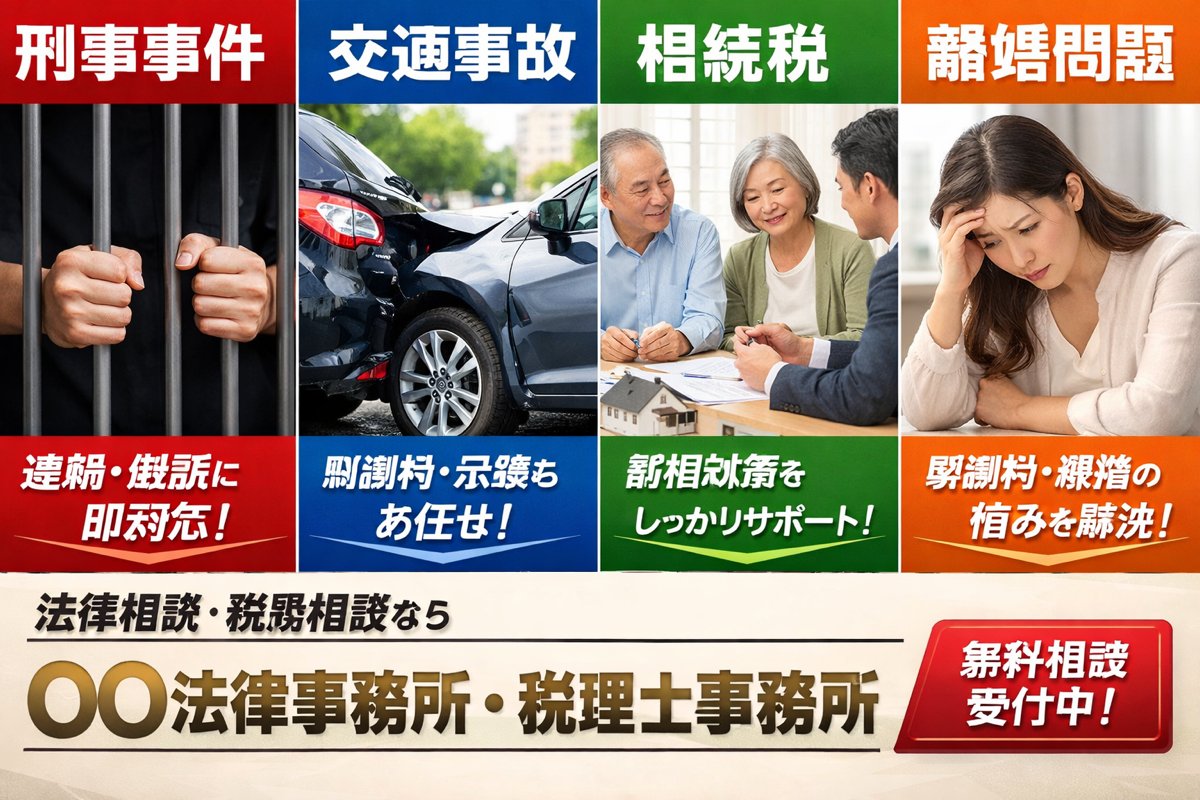
Generate a photo-real Japanese legal ad banner with four service panels, urgent CTA, and professional layout using this detailed prompt.
Striking Japanese Legal Services Banner — Sora 2 Image Prompt
PROMPT · EN
一张采用日本列表广告风格的落地页首屏横幅,专为虚构的律师事务所和税务师事务所设计,呈现出醒目的网页广告效果,顶部设有四个等宽的垂直面板,底部设有强力的行动号召区域。顶行包含 4 个服务面板,每个面板均配有彩色标题栏、写实风格的素材图片以及底部的彩色说明栏。面板 1 为红色,顶部标注「刑事事件」,展示了一双紧握黑色背景下深色监狱铁栏的手部特写;底部红色说明栏以醒目的白色粗体日文写着「逮捕・訴訟に即対応!」。面板 2 为蓝色,顶部标注「交通事故」,展示了日光下城市街道上两辆受损深色轿车的真实追尾场景;底部蓝色说明栏以醒目的白色粗体日文写着「慰謝料・示談もお任せ!」。面板 3 为绿色,顶部标注「相続税」,展示了一对老年夫妇坐在桌前咨询身着西装的专业人士,桌上可见文件和一个小型房屋模型;底部绿色说明栏以醒目的白色粗体日文写着「税相続対策をしっかりサポート!」。面板 4 为橙色,顶部标注「離婚問題」,展示了一位神情忧郁的女性坐在室内,单手托腮;底部橙色说明栏以醒目的白色粗体日文写着「慰謝料・親権の悩みを解決!」。四个面板需边缘紧贴,并以干净的白色线条分隔,每个面板宽度一致,采用高饱和度原色及光泽感的广告设计风格。在四个面板下方,创建一个奶油色或浅米色的背景页脚区域。左侧放置一行较小的黑色日文副标题:「法律相談・税務相談なら」。正下方居中放置金属金渐变色、带有轻微斜面效果的粗体日文主事务所名称:「argoffice name: 〇〇法律事務所・税理士事務所」。在事务所名称上下方添加细黑色水平分割线。右下角放置一个大型光泽红色圆角矩形按钮,带有明亮的渐变效果,并配有白色粗体日文:「argbutton text: 無料相談受付中!」。整体风格应呈现出日本法律与税务服务 LP 列表广告主视觉的效果:企业化、紧迫感、值得信赖、商业化、基于照片、干净的网格布局、醒目的排版、高对比度以及写实的宣传册级合成效果。

About this prompt

Generate a photo-real Japanese legal ad banner with four service panels, urgent CTA, and professional layout using this detailed prompt. Use it as a Concept Art starting point for GPT Image 2: keep the visual structure and style constraints intact, then swap in your own subject, brand, or scene.

Start by replacing office name and button text, then keep the camera, composition, and material cues in the same order. This makes the output easier to compare across variations.

How to use this prompt

  1. Copy the prompt text.
  2. Open Sora 2 or a compatible AI image generator.
  3. Paste the prompt and customize the office name and button text if desired (or keep defaults).
  4. Set aspect ratio to 16:9 and generate.
  5. Review the result; refine the prompt for further adjustments.

FAQ

岡野タケシ弁護士【アトム法律グループ】

@takeshibengo→

Published
Apr 25, 2026
Language
EN
Model
GPT Image 2
Category
Concept Art
GPT Image 2Concept Artgpt-image-2twitter
Views
5.1K
Copies
557
Likes
106

Share

More from GPT Image 2

Browse all
Gothic Anime Girl with Hidden Face — Sora 2 Prompt

Gothic Anime Girl with Hidden Face — Sora 2 Prompt

@hoshi122221
Anime Idol Profile Page — Lavender Art Style Prompt

Anime Idol Profile Page — Lavender Art Style Prompt

@uzuyanurp
Celebrity Crossover — Sora 2 Prompt

Celebrity Crossover — Sora 2 Prompt

@Conor_D_Dart

Create faster with Sora2Hub prompts.

Use curated prompt pages as searchable entry points, then jump straight into generation with the right model context.

Explore prompts