
Sora2 Hub
Sora2 Hub
  • Prompt Library
  • Pricing
  • Showcase
  • Blog
Sora2 Hub
Sora2 Hub
Sora2 Hub

Sora2 Hub

Professional AI creation platform powered by Sora 2, Veo 3.1, and Nano Banana Pro. Create stunning videos and studio-grade images with advanced control, HD quality, and no watermarks.

Email:support@sora2hub.org

AI Video Generator

  • Text to Video
  • Image to Video
  • Veo 3.1
  • Sora 2
  • Kling 3.0
  • Kling 2.6
  • Kling 2.5
  • Runway
  • Wan 2.6
  • Seedance 2.0
  • Hailuo 2.3
  • Grok Imagine
  • HappyHorse-1.0

AI Image Generator

  • Text to Image
  • Image to Image
  • Nano Banana Pro
  • Nano Banana
  • 4o Image
  • Flux Kontext
  • Z Image
  • Seedream 4.5
  • Seedream 5.0 Lite
  • Nano Banana 2
  • GPT Image 2
  • AI Image Upscaler

AI Effects

  • AI Age Filter
  • AI Gender Swap
  • AI Kiss
  • AI Hug
  • Ghibli Image
  • AI Mermaid Filter
  • AI Bodyshake
  • Smiling Filter
  • AI Fat
  • Action Figure

Product

  • Features
  • Showcases
  • Pricing

Company

  • About
  • Contact

© 2025 • Sora2 Hub ORG All rights reserved.

  • Privacy Policy
  • Terms of Service
  • Refund Policy
  1. Home
  2. /
  3. Prompts
  4. /
  5. GPT Image 2
  6. /
  7. Cute Pastel School Drama Relationship Chart — Sora 2 Prompt
GPT Image 2AI Prompt

Cute Pastel School Drama Relationship Chart — Sora 2 Prompt

Effortlessly design a charming school drama character map, complete with pastel colors, doodle icons, and handwritten relationship notes.
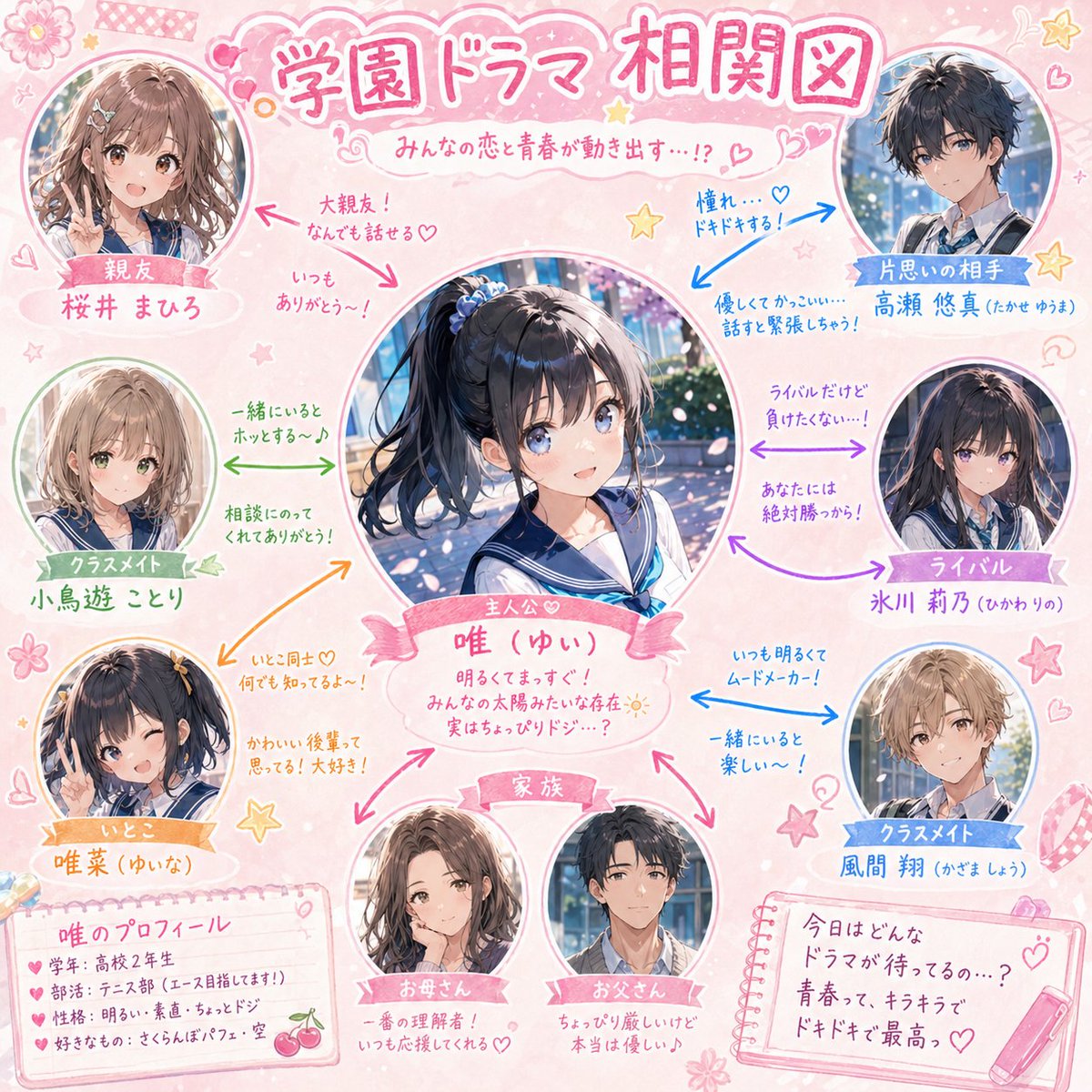
Cute Pastel School Drama Relationship Chart — Sora 2 Prompt
PROMPT · EN
请根据附件插图中的角色,创建一个校园剧风格的“人物关系图”。 [要求]
- 主角姓名:[argcharacter name: 在此输入姓名]
- 将主角置于画面中心,突出显示。
- 以放射状布局围绕主角排列好友、竞争对手、暗恋对象、家人、同学、表亲等。
- 每个角色以可爱的头像或半身剪纸插画形式呈现。
- 使用彩色箭头(→)连接各个人物关系。
- 在箭头旁添加简短、可爱的手写风格注释(例如:“最好的朋友!”、“怦然心动……”、“虽然是竞争对手,但……”)。
- 整体设计采用 argcolor theme: 粉色/粉彩 色调,并点缀星星、爱心和花朵等可爱装饰。
- 标题应采用“校园剧人物关系图”风格。
- 营造出温馨有趣的校园青春喜剧氛围。

About this prompt

Effortlessly design a charming school drama character map, complete with pastel colors, doodle icons, and handwritten relationship notes. Use it as a Concept Art starting point for GPT Image 2: keep the visual structure and style constraints intact, then swap in your own subject, brand, or scene.

Start by replacing character name and color theme, then keep the camera, composition, and material cues in the same order. This makes the output easier to compare across variations.

How to use this prompt

  1. Copy the prompt template below.
  2. Open your AI image generator (e.g., Sora 2, DALL·E 3, Midjourney).
  3. Replace {character name} with your protagonist’s name and {color theme} with your preferred pastel palette.
  4. Generate the image. If needed, add extra details like specific relationship types or additional characters.
  5. Download your adorable school drama character chart!

FAQ

K T

@KT_first_story→

Published
Apr 30, 2026
Language
EN
Model
GPT Image 2
Category
Concept Art
GPT Image 2Concept Artgpt-image-2twitter
Views
1.1K
Copies
94
Likes
57

Share

More from GPT Image 2

Browse all
Dynamic Nike Ad Poster — Sora 2 Prompt with Sydney Sweeney

Dynamic Nike Ad Poster — Sora 2 Prompt with Sydney Sweeney

@im_shahid7
Gothic Anime Girl with Hidden Face — Sora 2 Prompt

Gothic Anime Girl with Hidden Face — Sora 2 Prompt

@hoshi122221
Cubist Minimalist Fashion Portrait — Sora 2 Prompt

Cubist Minimalist Fashion Portrait — Sora 2 Prompt

@ChillaiKalan__

Create faster with Sora2Hub prompts.

Use curated prompt pages as searchable entry points, then jump straight into generation with the right model context.

Explore prompts

