
GPT Image 2AI Prompt
Japanese Summer Fashion Ad Poster — Sora 2 Prompt
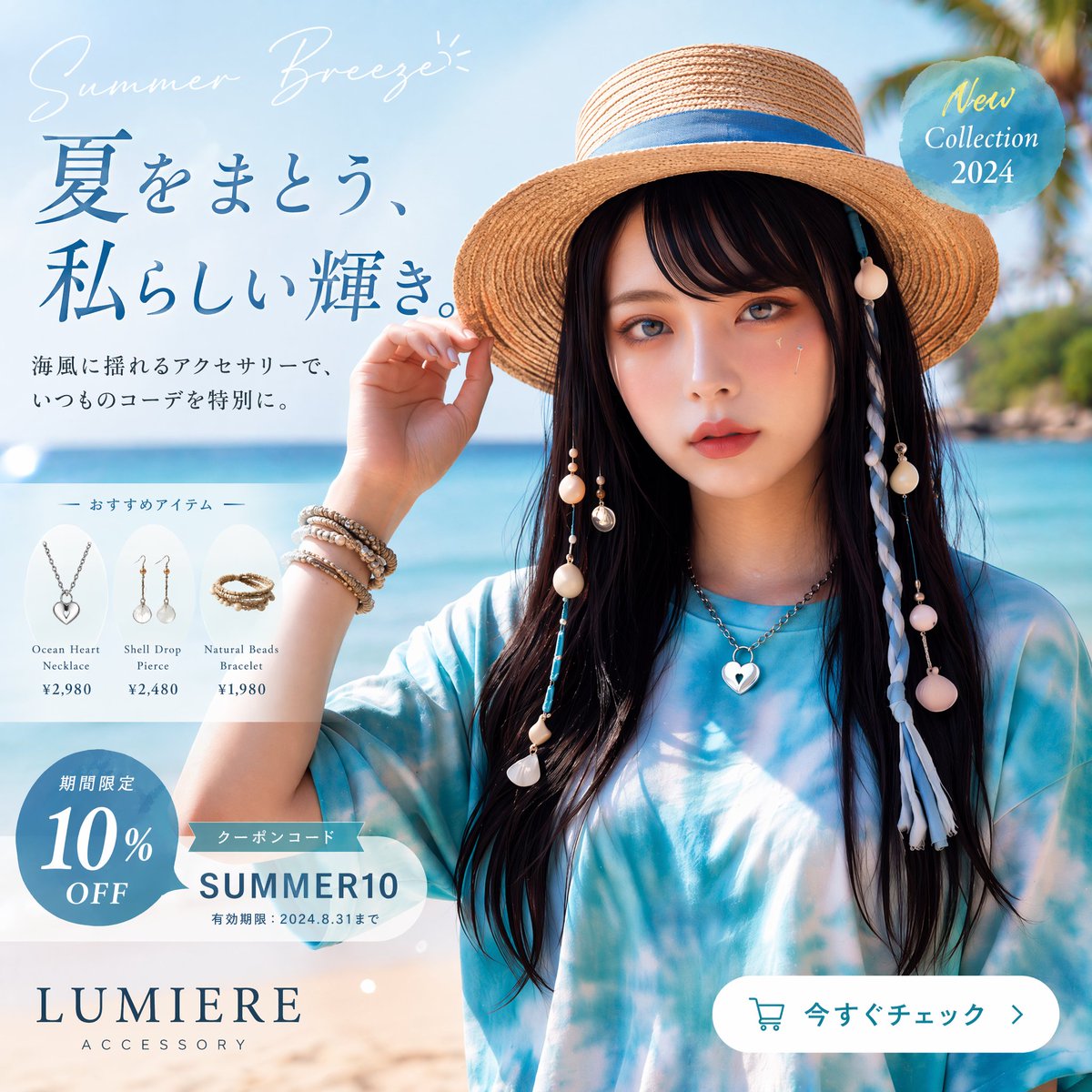
Generate a high-end Japanese summer beach fashion ad poster with model, accessories, product cards, and promotional badge, ready for e-commerce use.
PROMPT · EN
创作一张精致的日系夏季时尚广告海报,采用 1:1 正方形布局,呈现明亮通透的海岸生活方式摄影风格,具备高端产品目录的质感。画面展示一位年轻女性的半身像,背景为热带海滩,拥有绿松石色的海洋、浅色沙滩、柔和的天空,右上角背景处有轻微虚化的棕榈叶。她戴着一顶带有蓝色丝带装饰的宽檐天然草编遮阳帽,留着长直黑发,身穿宽松的蓝白扎染上衣。她的面部被居中的柔和矩形模糊块遮挡。一只手轻轻触碰帽檐。在帽子和头发两侧添加海滩风发饰:带有贝壳、珠子、流苏和圆形装饰的挂绳,右侧包含一条长长的白蓝编织发辫。她佩戴 4 件显眼的珠宝:一条银色心形吊坠项链、手腕上叠戴的珠饰与金属手链、左侧一只贝壳垂坠耳环、右侧一只贝壳垂坠耳环。使用柔和的自然光,采用干净的高端产品广告风格,肤色温润,色调为清爽的夏季蓝色。 将图像设计为商业海报,日文文字和产品标注围绕模特进行整合。在左上角,放置手写体英文短语 argtagline: Summer Breeze,使用纤细优雅的白色字体。下方添加一行深蓝色明朝体大标题:argheadline text: 夏をまとう、私らしい輝き。。在其下方,添加两行深灰色的日文正文:“海風に揺れるアクセサリーで、” 以及 “いつものコーデを特別に。”。 在左侧中部,创建一个半透明的白色圆角面板,标题为 “— おすすめアイテム —”,其中横向排列 3 张产品卡片。卡片 1 展示银色心形项链,标签为 “Ocean Heart Necklace”,价格为 “¥2,980”。卡片 2 展示贝壳垂坠耳环,标签为 “Shell Drop Pierce”,价格为 “¥2,480”。卡片 3 展示天然珠饰手链,标签为 “Natural Beads Bracelet”,价格为 “¥1,980”。 在左下角,添加一个蓝色圆形折扣徽章,内含白色日文 “期間限定” 和大号文字 “10% OFF”。在其上方叠加一个白色优惠券胶囊标签,带有蓝色小丝带图标,包含 “クーポンコード” 和大号代码 argcoupon code: SUMMER10,以及小字 “有効期限:2024.8.31まで”。 在右上角,放置一个半透明的水蓝色圆形徽章,带有优雅的浅色文字 “New Collection 2024”。在左下角,添加品牌 Logo 文字 argbrand name: LUMIERE,使用大号衬线体大写字母,下方配有间距较宽的 “ACCESSORY” 字样。在右下角,放置一个带有青色轮廓购物车图标的白色圆角行动呼吁按钮,文字为 argbutton text: 今すぐチェック,后跟一个向右的箭头。保持所有排版精致且平衡,呈现出高端日系时尚电商的促销布局。
About this prompt
Generate a high-end Japanese summer beach fashion ad poster with model, accessories, product cards, and promotional badge, ready for e-commerce use. Use it as a Concept Art starting point for GPT Image 2: keep the visual structure and style constraints intact, then swap in your own subject, brand, or scene.
Start by replacing tagline, headline text, coupon code, and brand name, then keep the camera, composition, and material cues in the same order. This makes the output easier to compare across variations.
How to use this prompt
- Copy the prompt text and paste into your AI image generator (e.g., Sora, DALL-E, Midjourney).
- Adjust the customizable arguments like
tagline,headline text, andcoupon codeto fit your brand. - Select the square (1:1) aspect ratio and ensure the model supports detailed text rendering.
- Generate the image. For best results, use a model with strong typography and photorealism capabilities.
- Review the output and tweak the prompt or regenerate if any elements need refinement.


