
Sora2 Hub
Sora2 Hub
  • Prompt Library
  • Pricing
  • Showcase
  • Blog
Sora2 Hub
Sora2 Hub
Sora2 Hub

Sora2 Hub

Professional AI creation platform powered by Sora 2, Veo 3.1, and Nano Banana Pro. Create stunning videos and studio-grade images with advanced control, HD quality, and no watermarks.

Email:support@sora2hub.org

AI Video Generator

  • Text to Video
  • Image to Video
  • Veo 3.1
  • Sora 2
  • Kling 3.0
  • Kling 2.6
  • Kling 2.5
  • Runway
  • Wan 2.6
  • Seedance 2.0
  • Hailuo 2.3
  • Grok Imagine
  • HappyHorse-1.0

AI Image Generator

  • Text to Image
  • Image to Image
  • Nano Banana Pro
  • Nano Banana
  • 4o Image
  • Flux Kontext
  • Z Image
  • Seedream 4.5
  • Seedream 5.0 Lite
  • Nano Banana 2
  • GPT Image 2
  • AI Image Upscaler

AI Effects

  • AI Age Filter
  • AI Gender Swap
  • AI Kiss
  • AI Hug
  • Ghibli Image
  • AI Mermaid Filter
  • AI Bodyshake
  • Smiling Filter
  • AI Fat
  • Action Figure

Product

  • Features
  • Showcases
  • Pricing

Company

  • About
  • Contact

© 2025 • Sora2 Hub ORG All rights reserved.

  • Privacy Policy
  • Terms of Service
  • Refund Policy
  1. Home
  2. /
  3. Prompts
  4. /
  5. GPT Image 2
  6. /
  7. Historical Bedroom Isometric Map — Sora 2 Prompt
GPT Image 2AI Prompt

Historical Bedroom Isometric Map — Sora 2 Prompt

Creates a 2x2 grid of isometric bedroom interiors across four eras, using a weighted formula to mix time-specific toys, lighting, and pop culture UI.
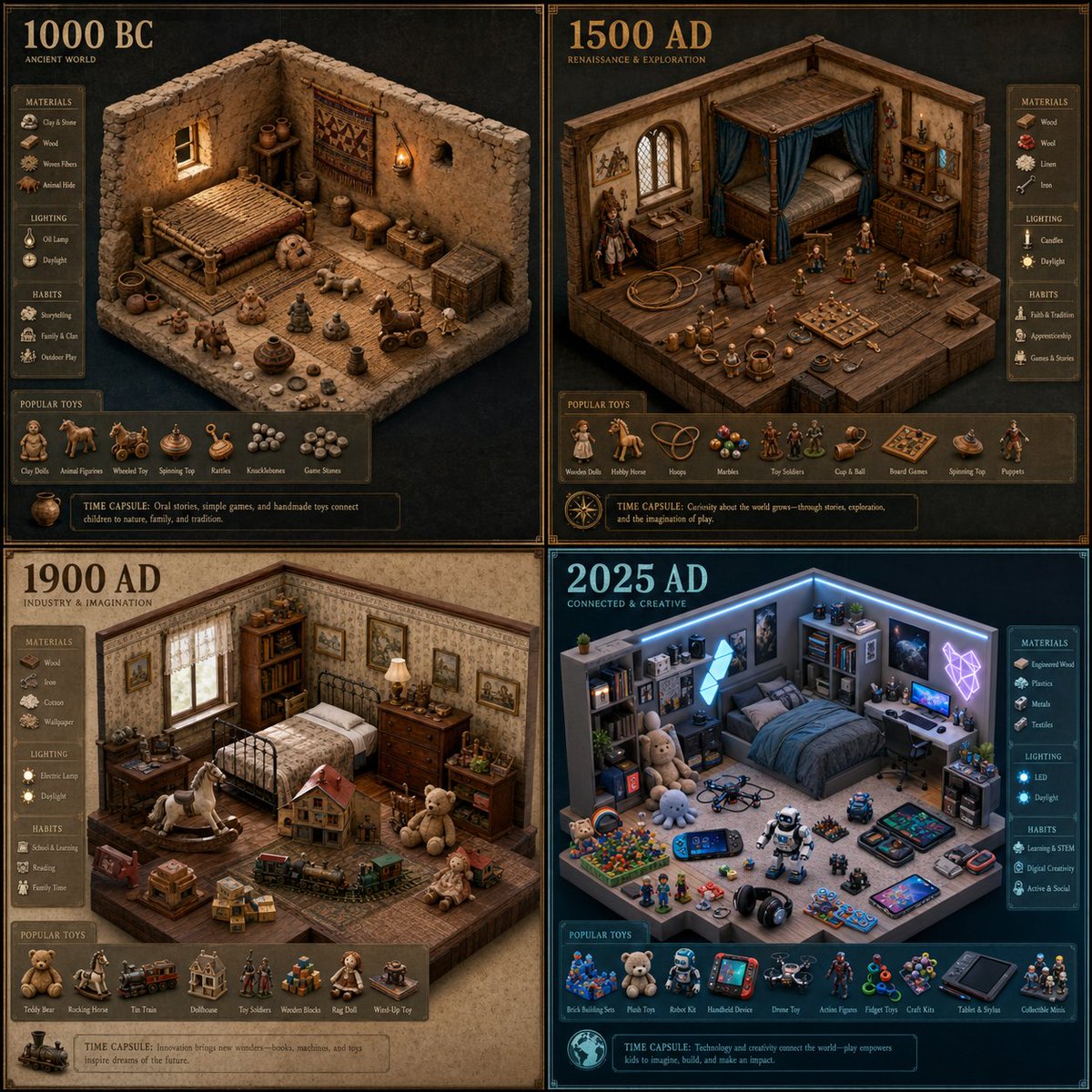
Historical Bedroom Isometric Map — Sora 2 Prompt
PROMPT · EN
2x2 网格,执行以下操作 argeras: 1000 BC, 1500 AD, 1900 AD 2025 AD Render_Target = ( Isometric_Raised_Interior_Map_Of_s_Bedroom_In_[Era] * 1.2 ) + ( Pop_Culture_Time_Capsule_Infographic_UI * 1.5 ) + ( Popular_Toys_of_era * 2.5 ) + ( Era_appropriate_lighting_With_[DECADE]_Filters * 1.0 ) - ( Generic_Retro_Console_And_Rubik's_Cube / 3.0 ) - ( Historically_Inaccurate_Posters / 2.5 ) - ( Flat_2D_Furniture_Showroom_View / 2.0 )

About this prompt

Creates a 2x2 grid of isometric bedroom interiors across four eras, using a weighted formula to mix time-specific toys, lighting, and pop culture UI. Use it as a Concept Art starting point for GPT Image 2: keep the visual structure and style constraints intact, then swap in your own subject, brand, or scene.

Start by replacing eras, then keep the camera, composition, and material cues in the same order. This makes the output easier to compare across variations.

How to use this prompt

  1. Copy the entire prompt, including the default eras.
  2. Select Sora 2 or a compatible AI model that supports complex parameter instructions.
  3. Change the eras argument to any four historical periods you want to compare.
  4. Adjust the numeric weights (e.g., * 2.5, / 2.0) to emphasize or de-emphasize specific elements like toys or lighting.
  5. Generate and review the output; iterate on the weights for your desired balance.

FAQ

Gadgetify

@Gdgtify→

Published
May 15, 2026
Language
EN
Model
GPT Image 2
Category
Concept Art
GPT Image 2Concept Artgpt-image-2twitter
Views
89
Copies
8
Likes
6

Share

More from GPT Image 2

Browse all
Dark Anime Devil Girl Mario Kart Poster — Sora 2 Prompt

Dark Anime Devil Girl Mario Kart Poster — Sora 2 Prompt

@opener_ai
Gothic Anime Girl with Hidden Face — Sora 2 Prompt

Gothic Anime Girl with Hidden Face — Sora 2 Prompt

@hoshi122221
Minimalist Japanese Electric Nail Clipper Product Landing Page — Sora 2 Prompt

Minimalist Japanese Electric Nail Clipper Product Landing Page — Sora 2 Prompt

@eisho_m

Create faster with Sora2Hub prompts.

Use curated prompt pages as searchable entry points, then jump straight into generation with the right model context.

Explore prompts

